Can you update a product page, add a release note and hand the website to a teammate without involving its original builder in every change?
That is a useful starting question when choosing a website builder. The first attractive page matters, but a SaaS marketing website also needs a workable content model, a reliable route from draft to publication and an understood way to leave or change the platform.
This guide compares six resources through those recurring tasks: Framer, Webflow, Wix, Squarespace, WordPress.com and Carrd. It includes an original content-model exercise and current official export distinctions that a simple “portable or locked in” label can hide.
Official information was checked on 2 November 2026. Provider previews show public product pages, not sites built or benchmarked for this comparison. Plan entitlements need checking for the selected account; no platform is declared a universal winner.
Choose the website workflow the team can maintain after launch.
Design task
Separate the public website from the SaaS application
A marketing website may explain a product, publish useful material and direct a visitor to a trial or demo. The product itself may require authentication, customer records, payments and application permissions.
Do not assume that a builder's marketing, membership or commerce features automatically satisfy the product's requirements. Write down which operations belong to the public website and which belong to an existing application or another maintained service.
For a fictional project-management SaaS, the website might own product explanations, pricing information and a release-note library. The application owns the signed-in project workspace. A “Start trial” button should connect those experiences accurately without implying that a marketing-page builder has implemented the workspace.
This boundary makes the shortlist smaller. Evaluate a website builder for the site it must maintain, then verify any required connection separately.
List the updates that will happen repeatedly
A useful pilot includes the team's ordinary work, rather than only a polished homepage. Name the people responsible for copy, layout, review and publication.
| Recurring update | Question for the evaluation |
|---|---|
| Product explanation | Can an editor change real copy without breaking the layout? |
| New release note | Does the content model create the required page and listing? |
| Related-content link | Can the team maintain its destination and presentation? |
| Correction | Can a reviewer understand what changes before publication? |
| Handoff | Can another authorized person repeat the update? |
| Exit | Which content, assets and functions can be moved or rebuilt? |
Choose a few essential conditions before scoring convenience. A platform that is enjoyable to design in can still fail a required publishing or ownership condition. Conversely, a familiar workflow may be sufficient without adopting the latest editing feature.
Resource collection
Compare the intended role
These candidates span visual site production, managed publishing and a deliberately narrower one-page model. Their scope differences are useful when deciding which work the site actually needs.
| Resource | Relevant starting point | Important boundary to inspect |
|---|---|---|
| Framer | Editable design canvas with hosted publishing and CMS | Managed hosting and required content/review workflow |
| Webflow | Visual website production and structured content | Site versus Workspace entitlements and service-dependent exports |
| Wix | Hosted website and business/content features | Exact editor, collection structure and collaborators |
| Squarespace | Hosted pages, templates and publishing features | Trial/paid access and partial content portability |
| WordPress.com | Managed WordPress hosting and publishing | Hosted service conditions, theme/plugin choices and content export |
| Carrd | One-page websites and optional Pro functions | Whether the narrow scope fits the actual site |
The table describes candidates to investigate. It does not measure accessibility, search rankings, conversion rates or the speed of a team learning a new editor.
Framer: evaluate visual editing together with content production
Framer's current product page presents an editable canvas, CMS and hosted publishing. Its public examples show both design and content workflows, including optional agent-assisted work.
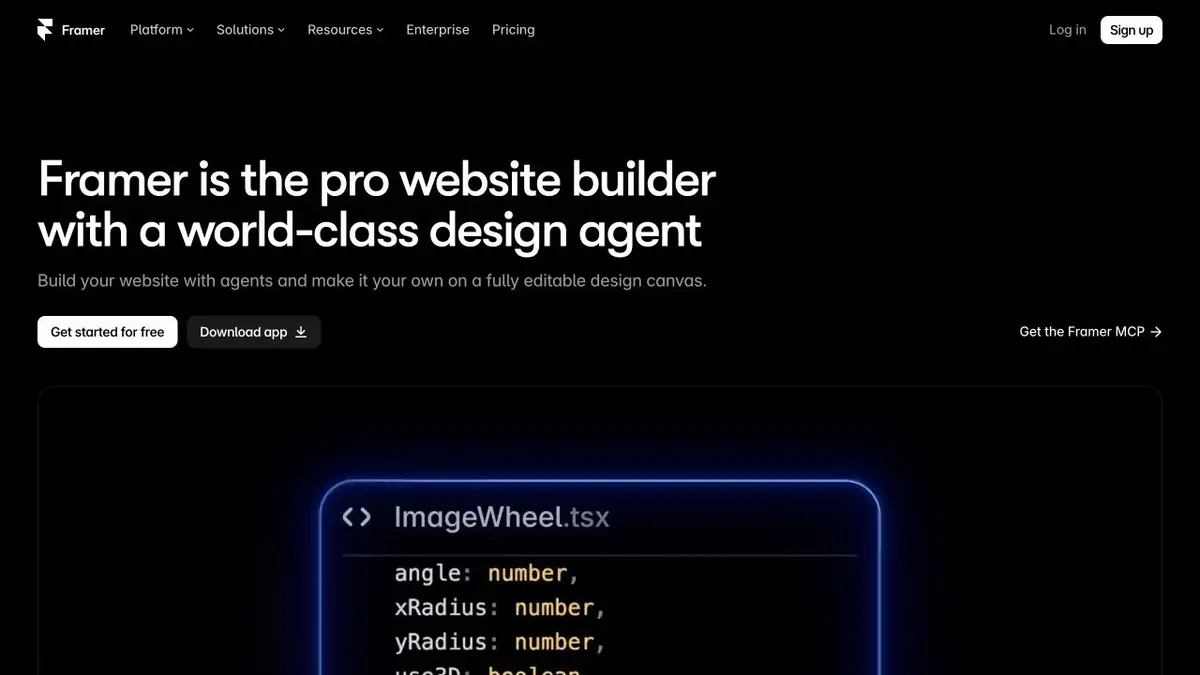
Credit: Framer. Actual public-page capture on 2 November 2026. Provider demonstrations and performance figures are not results from our pilot.
Use a real content type to evaluate the workflow: a release note with a title, cover, summary and body, for example. Ask the intended editor to change that content and inspect its presentation on both the item page and its listing.
Framer's official self-hosting FAQ says it does not offer HTML export for self-hosting. If independent hosting is a requirement, resolve that boundary before a large build. This does not establish that every asset or content record lacks a separate transfer route.
Webflow: distinguish site production from a complete portable service
Webflow presents visual site building, CMS, collaboration and publishing workflows. Evaluate its chosen setup with the actual designer and editor, including the relationship between a collection item and the pages that display it.
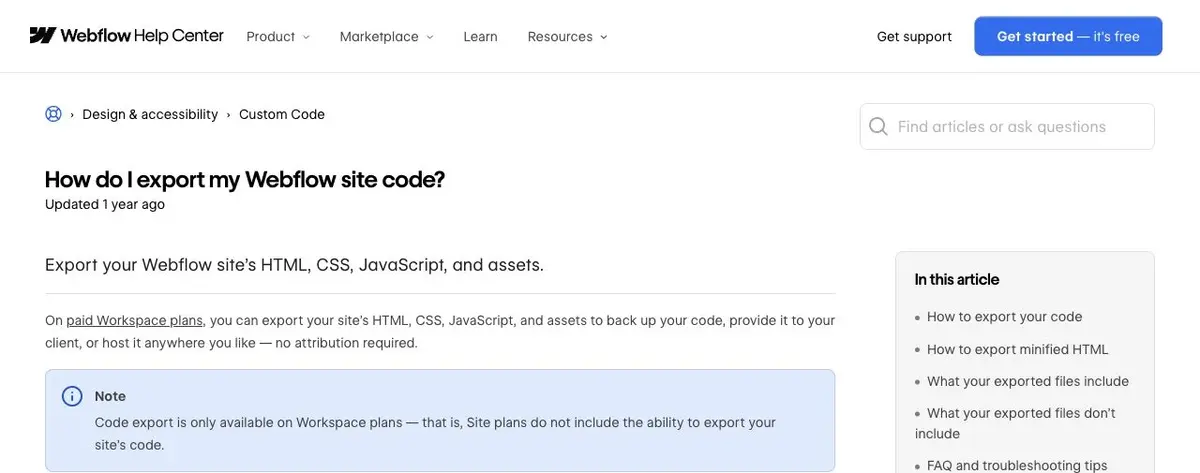
Credit: Webflow. Upper section of the official export guide captured on 2 November 2026; cropped below its plan note. This is documentation, not a site-export test.
Its code-export documentation identifies paid Workspace requirements and exclusions. CMS functionality, native form processing, site search and other platform-dependent features are not a complete portable application inside the exported code. Collections can have a separate CSV route.
That matters when a teammate hears “code export” and expects every content page and service to work elsewhere. Ask which files are available and what needs rebuilding. Check Site and Workspace conditions separately rather than assuming a hosting subscription supplies every collaboration or export capability.
Wix: name the chosen editor and collection model
Wix offers hosted website creation alongside content and business features. Its current product family includes different creation routes; the selected editor and configuration belong in the evaluation record.
Use one representative structured page rather than relying on the existence of a CMS label. Define the fields, create the record and inspect how the required views use that data. Include realistic content lengths and the person responsible for routine changes.
The official collection-export guide documents CSV export of collection content or structure. That is a useful data route, but it does not establish that the complete visual website, integrations and services migrate together.
Squarespace: evaluate the actual content library
Squarespace presents website templates, page editing, blogging and other business functions. A relevant pilot should include the content that the SaaS team will repeatedly publish, rather than only a sample homepage.
Its content-export documentation describes a partial XML export intended for compatible content import. The documented exclusions include style settings, custom CSS and drafts, among other content. This is not a complete downloadable copy of the website's design and services.
Use that distinction when planning an exit. Preserve the source material and identify what another environment would require. Trial access, subscription features and any optional business services should be checked through the current pricing route, without inheriting an older comparison's prices or inclusion assumptions.
WordPress.com: distinguish the managed service from other WordPress setups
WordPress.com describes managed WordPress hosting with themes and publishing capabilities. It is a particular hosted service, rather than a synonym for every self-hosted WordPress installation or plugin combination.
Evaluate the theme, editor and selected service conditions together. A pilot release-note entry should expose whether the maintainer can update content without repeatedly changing page structure. Any plugin dependency also needs an owner and a clear reason to exist.
Its official export guide explains that content XML contains written records and media links, rather than actual media files, theme design, customizations and plugins. A separate full-backup or migration route is a different question.
Check the current plan for the chosen setup. No blanket plugin-entitlement or storage claim from another publisher is inherited here, and no theme or migration was tested for this guide.
Carrd: respect the one-page scope
Carrd explicitly focuses on one-page websites. That can be relevant for a focused campaign or early public presence when the brief does not require a growing multi-page content library.
Credit: Carrd. Public-page capture on 2 November 2026. No signup form, publication or downloaded site was tested.
Do not force a release-note library into this scope merely to keep one tool. Decide whether the site is actually one page and where any larger content collection will live.
Carrd's official download documentation says Pro Plus or higher can download HTML, CSS and JavaScript. Platform-dependent elements, notably forms, are not functional in that download, and the downloaded site cannot be uploaded back to Carrd. This corrects blanket claims that Carrd has no export at all without implying that it supplies a complete service migration.
Fit and limitations
Model one content item before committing to a CMS
A CMS label does not establish the structure the site needs. Write a small content model in ordinary language before evaluating the editor.
For the fictional SaaS release-note library, a record might need a title, slug, status, cover image, summary and body. A product or category reference can be added if the design actually uses it. Do not create fields merely because a spreadsheet can contain them.
The original diagram below shows one record feeding an index, an article page and a related-content card. It is a proposed evaluation model, not a configuration installed in any of the six products.
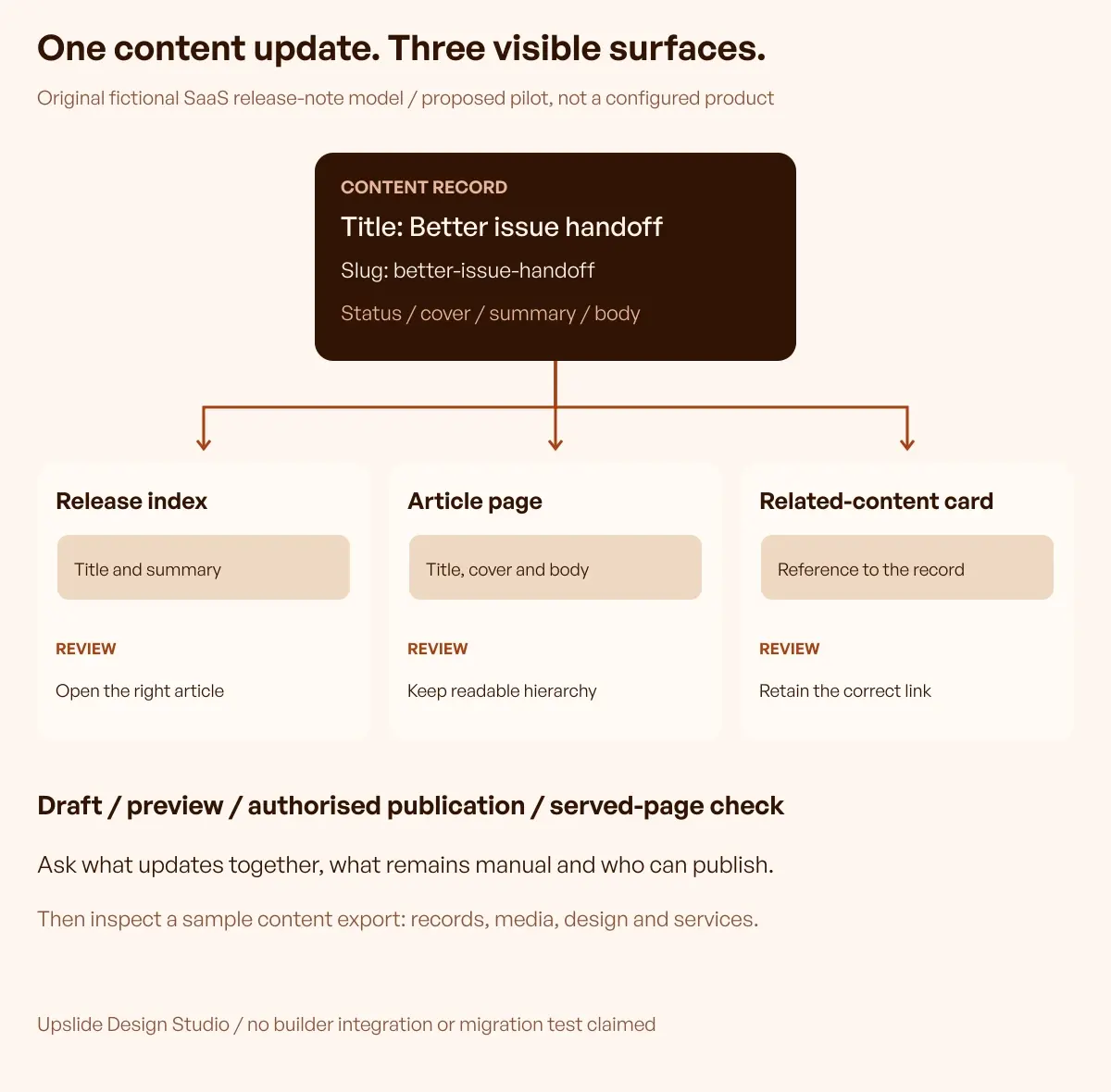
Original explanatory graphic: Upslide Design Studio. Arrows represent intended content relationships, not verified integrations or an automatic publishing workflow already running.
Change the title and summary once in the pilot. Inspect where those changes appear, whether any view still needs manual work and whether the links remain correct. This reveals more than a feature-table checkmark for “CMS included.”
Draft, preview and published are different states
A preview can show how an update might look without proving that the intended public version is live. A successful save can be only a stored draft. A publish action can have a wider scope than the single item being reviewed.
Identify those states in the chosen workflow. Ask how the reviewer sees the change, who can authorize publication and how the team checks the actual served result afterward.
Also identify the recovery route for an ordinary correction. The evaluation should explain what can be restored and what still needs manual repair. Do not infer a working rollback process merely because the platform displays a history feature.
Export has several meanings
An export can contain content records, media links, media files, static code or a broader backup. Those objects are not interchangeable.
The official examples above illustrate the difference: collection CSV, partial XML and static code can each be useful while leaving other work behind. A downloadable file is evidence of an available artifact, not evidence that another host can reproduce every behavior.
Write the exit question by object: “Can we retain these release-note records and their images?” is more precise than “Can we export the site?” Keep design, content and service dependencies visible in the answer.
How to choose
Build the smallest representative pilot
Select a page that exposes the real constraints. For a SaaS site with ongoing publishing, that may be one product page and one release-note item linked from an index. Use realistic headings, image shapes and body length.
The pilot needs both content and layout changes. A founder should try an ordinary copy correction. A designer should inspect a narrow layout and a longer heading. A reviewer should identify what will change before publication.
Record the actual work required instead of a general ease-of-use score. If changing a cover requires several manual placements, that is a specific maintenance cost the team can discuss.
Inspect content relationships and exceptions
Add another item that differs from the ideal sample. It might have a long title, no optional image or a category label that wraps. Check both the individual page and every listing or related card that displays it.
Decide how an omitted field behaves. A layout that works only when every optional field is filled may create editing pressure or misleading filler. The content model should reflect genuine requirements and intentional empty states.
Keep page content and navigation relationships understandable. If a slug changes, the team should know which links and redirects need attention. Test the relevant process on a permitted pilot rather than assuming every reference updates itself.
Give the maintainer an ordinary handoff task
Ask a teammate who did not build the pilot to perform the expected update using the proposed instructions and access. That reveals whether the workflow depends on knowledge still held by the original designer.
Include source ownership, billing ownership, domain responsibility and integration ownership in the handoff record. These do not need to belong to the same person, but unresolved responsibility becomes a recurring problem later.
The handoff is successful when the next editor can perform the named operation and explain how it reaches the public site. A tour of the dashboard is weaker evidence than the completed update.
Keep design quality and platform selection connected
The SaaS website examples guide helps study product explanations, evidence and next actions. Use those decisions to form a pilot brief, while keeping software selection grounded in the actual update workflow.
For example, a reference may suggest a clearer product demonstration. That does not tell the team which builder produced it, what its CMS stores or how it performs commercially. Select a platform by verified needs and observed work, rather than inferring hidden infrastructure from appearance.
Compare the complete operating requirement
A useful decision record names the required domain, hosting route, content capacity, editor access and necessary integrations. Check the applicable plans, billing period and services at the time of selection.
Avoid a headline-price comparison that mixes a learning account, an annually billed website and an agency workspace. They may provide different things. This guide supplies no total-cost estimate because the chosen configuration and commercial requirements are not known.
Keep an unresolved requirement as an explicit hold. If a necessary form, content relationship or export cannot be verified, resolve it before expanding the pilot into a whole site. The appropriate outcome may be keeping the existing platform rather than migrating.
Frequently asked questions
Which website builder is best for a small SaaS team?
Choose through the actual publishing and handoff work. Compare the required site, content structure, maintainers and service connections. A one-page launch and an ongoing resource library can reasonably lead to different shortlists.
Can a website builder also build the SaaS product?
Some platforms offer additional application-related features, but those need their own evaluation. Marketing pages and a signed-in product workspace have different requirements. Define that boundary and verify the relevant operations separately.
Does a CMS guarantee that every related page updates automatically?
No such guarantee follows from the label. Model one record, connect the required views and inspect the effect of a change. Record remaining manual updates and exceptions before relying on the arrangement.
Is code export a complete migration plan?
No. Identify which files, records and functions the export contains. Native forms, content services, media and design can need separate transfer or reconstruction. Test the relevant artifact and destination before treating migration as solved.
Does Carrd have no export option?
Its current official documentation describes source download on Pro Plus or higher, with platform-dependent function limits and no upload-back route. That is more specific than either “no export” or “everything transfers.”
Is WordPress.com the same as self-hosted WordPress?
WordPress.com is a managed hosting and publishing service. A self-hosted installation has a different operational setup and choices. Evaluate the actual selected route, theme, plugins and plan rather than borrowing assumptions from the name.
Will choosing a builder improve rankings automatically?
This guide makes no ranking promise. Verify the actual pages, metadata, content and required technical behavior, then measure search performance separately. A provider's SEO feature description is not a forecast for the website.
When should a team consider changing platforms?
Consider it when a required workflow repeatedly fails or a new condition cannot be supported acceptably. Pilot the alternative with the same work and account for migration effort. A new visual trend or feature announcement alone does not establish the benefit of moving.
Key takeaways
- Separate the public website from the product's application requirements.
- Compare recurring updates, content relationships and publication states.
- Let the intended maintainer complete a representative handoff task.
- Identify what an export contains and what remains platform-dependent.
- Resolve required capabilities and operating responsibilities before expanding the build.
At Upslide Design Studio, we help SaaS teams clarify design and website handoffs. Our selection criteria apply equally to an internal team or another partner. Use Resource Box for the relevant tools and Inspire for design references that answer a specific page question.