Does your poster maker produce the file you need, or just a convincing preview? An editable design, a downloadable image and a print order can look like the same workflow until the next person asks for a particular format or a correction.
The useful starting point is the destination: a printed notice, a digital announcement or a hosted presentation. Each needs an accurate message and a usable output, while the required editing, dimensions and delivery arrangements can differ.
This guide compares Canva, Adobe Express and Piktochart as documented routes through that task. An original fictional poster then demonstrates actual PDF page-box and content checks, alongside a separately generated digital image. It does not benchmark the providers or certify a print result.
Choose the destination before the template. Inspect the delivered file after the design looks finished.
Design task
Define the poster’s purpose and its next step
A community announcement, a product launch and an educational display need different content. Begin with the question the poster should answer and the action, if any, that follows from it.
For an event announcement, confirm the subject, date, time zone, venue or online arrangement, participation conditions and next step. For a product message, confirm the offer and any qualification that must remain attached to it. A template’s sample wording is not an approved brief.
Keep a short source record for those details. If the venue changes later, the designer needs to know which statement is authoritative and which exported versions still carry the old information. An attractive layout cannot resolve conflicting event details.
Distinguish the three delivery routes
A printed poster is a physical object produced from a file or an order. A digital image is a flattened visual placed inside another channel. A hosted interactive design can contain behavior that neither of those outputs preserves.
| Intended delivery | Requirement to settle early | Evidence needed at the end |
|---|---|---|
| External printing | Receiving printer’s size, file and production requirements | Actual exported file plus the printer’s review or proof |
| Platform print order | Product, region, quantity and order arrangement | Selected product and final order proof |
| Static digital announcement | Placement dimensions, accepted format and accompanying information | Actual image in the intended placement |
| Hosted interactive poster | Access, links and supported interactions | Published experience tested in its receiving context |
Choose the relevant route rather than assuming one download can serve every destination. A visible website address inside an image is not automatically an interactive link, and a print preview is not a completed print order.
Define what must stay editable
Recurring announcements need a maintained source. Decide who changes the next date, replaces an image or updates a condition, and whether that person has access to the selected workspace and assets.
Keep the editable design separate from the approved delivery. The exported image may be ideal for distribution while being unsuitable for a later text correction. Rebuilding the design from that flattened image introduces another opportunity to change spacing or omit information.
The published graphic-design software guide addresses that broader source and collaboration decision. This guide concentrates on making and delivering the particular poster.
Resource kit
Canva: connect the composition with the chosen output
Canva provides a poster-design route with templates and editable content. It can be useful when a team already maintains its visual materials there and the required poster can remain within that established workflow.
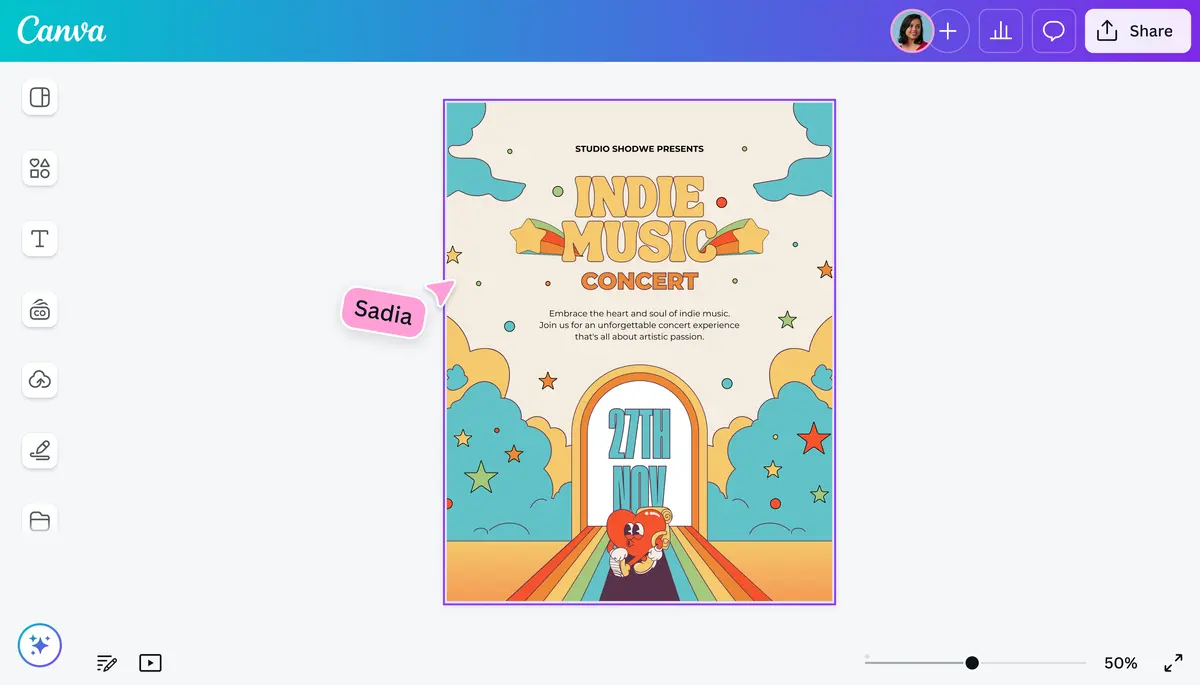
Credit: Canva and the displayed creators. Unchanged original provider illustration retrieved on November 4, 2026; its creation date is unknown. This is not an editor session or a poster produced by Upslide.
Canva’s file-type help distinguishes image and PDF downloads, including PDF Standard and PDF Print. Inspect the selected file type and account conditions before depending on a particular control or asset.
Its margin, bleed and crop-mark guidance also directs external-printing decisions toward the receiving printer. Keep that requirement separate from the size of a template. This guide does not adopt the page’s numerical examples as universal production specifications.
Check the exported result after a revision. A correct editor state does not establish that the recipient received that version, and a downloaded PDF does not establish acceptance by every print provider. No Canva export or order was operated for this comparison.
Adobe Express: distinguish downloading from ordering
Adobe Express’s poster page presents template customization and routes toward downloading or printing. Those alternatives should be identified before a team commits to a particular workflow.
A designer preparing a file for an external printer needs different evidence from someone ordering through an integrated service. Confirm the available product, region and account route rather than treating a generic print button as proof that every destination is covered.
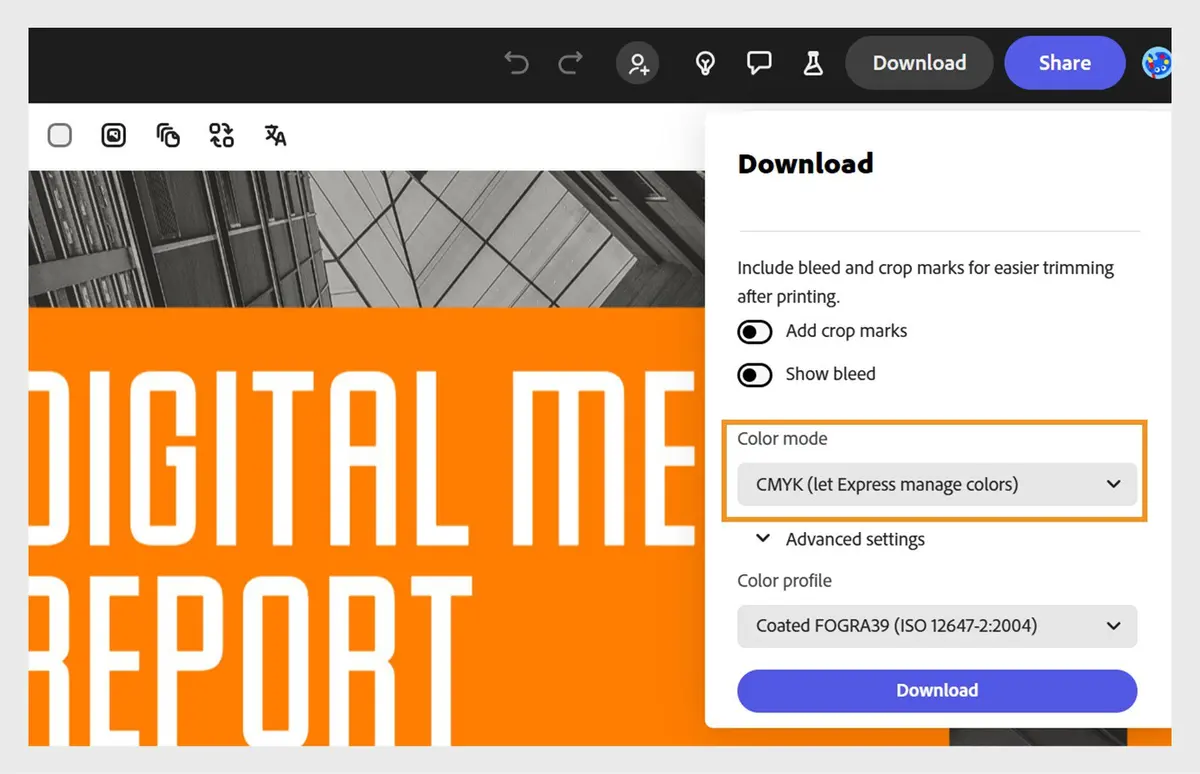
Credit: Adobe. Unchanged official help illustration retrieved on November 4, 2026; original creation date unknown. The pictured settings are documentation, not an export performed for this article.
Adobe’s PDF color-profile help documents PDF Print controls for crop marks, bleed and color profiles. It describes a CMYK default and an RGB choice when the printer manages color. That is a reason to obtain the receiving requirement, rather than declare one color mode correct for every job.
The public controls do not certify a specific file’s color appearance, fonts or production suitability. No account export, paid entitlement or printed output was tested here.
Piktochart: qualify the export entitlement first
Piktochart offers a route for composing visual material, including posters. It can suit an existing visual-content workflow, provided the required output and maintenance arrangement are available in the actual account.
Its current download help distinguishes plan entitlements: Pro supports PNG, while Business includes PDF and PPT alongside PNG. The Free route has limited, nonrenewing PNG download credits. Do not infer free PDF delivery from a general poster-making page.
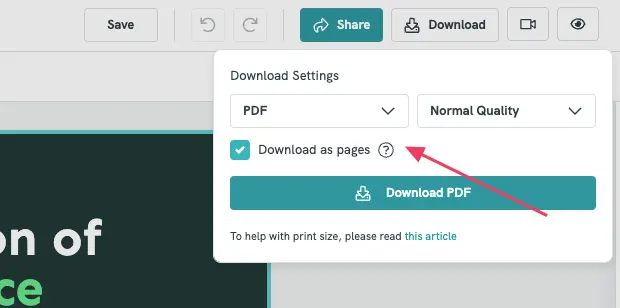
Credit: Piktochart. Unchanged official help illustration retrieved on November 4, 2026; original creation date unknown. This is not an operated account or proof that PDF is included in every plan.
The printing reference describes external printing after download and says downloaded copies do not have margin or bleed setup. That matters when the receiving printer requires a particular production layout. A suitable digital poster workflow may still need a different print-preparation route.
Check the current account before beginning a delivery that depends on those conditions. This comparison quotes no subscription prices and does not claim that an account upgrade guarantees a suitable print file.
Use the existing resource directory
All three routes already have entries in Resource Box. Follow the official destination for current access and export conditions, then choose around the actual task rather than the length of a feature list.
There is no universal winner here. Familiarity, the next editor’s access, the required delivery and the ability to correct the result can justify keeping an existing tool. A proposed change should resolve a concrete limitation.
How the pieces work together
Prepare the content before adapting a template
Collect the approved wording, images, logos and necessary usage information. Separate confirmed details from placeholders and unresolved questions before they become embedded in several versions.
Replace sample content systematically. Check dates, locations, contact details and small footer text as well as the headline. A visually convincing sample address can survive an otherwise careful redesign if no one owns the content check.
Asset access also needs attention. Being able to place a photo or font in an editor does not establish every intended use. Confirm the applicable asset and account terms for the planned distribution, without assuming that a free template makes all its components unrestricted.
Build a composition around the real message
Give the subject, explanation, practical details and next step deliberate roles. Keep necessary qualifications associated with the information they explain, even when they receive less visual emphasis.
The existing visual-hierarchy lesson addresses relative emphasis and grouping. Poster production adds another question: will those decisions remain usable at the actual destination and size?
A small digital announcement and a large physical poster may need different arrangements. Inspect each output with realistic content rather than approving a template’s short sample headline and assuming longer wording will behave identically.
Ask for the receiving specification
For external printing, request the actual dimensions, accepted file type, bleed, safe-area and color-handling requirements. Also clarify proofing, materials and any additional production conditions that affect the order.
These requirements belong to the selected product and provider. A number from a generic tutorial is not evidence that a different printer uses the same specification. Keep the agreed version of the requirement with the exported file.
For digital delivery, identify the receiving placement and accepted formats. Check what accompanying text or interaction is available outside the image. A flattened announcement should not silently become the only accessible source of essential information.
Export, reopen and review the actual file
Create an identifiable delivery version, then reopen that file independently of the editing document. Inspect its dimensions, content and appearance rather than relying only on the export dialog.
A content check can catch the wrong date while a visual review catches clipping or poor placement. A structural check can identify page dimensions while leaving color and readability unresolved. Keep those findings separate so one successful check does not stand in for all the others.
Retain the source and the delivered version together. When a correction is required, record which output changes and whether an earlier version has already been distributed or ordered.
Limitations and alternatives
A valid PDF is not a print approval
Opening a PDF demonstrates that a reader can interpret the file. It does not establish appropriate image detail, color handling, trimming, stock or legibility at the intended viewing distance.
Adobe’s page-box reference distinguishes the final trim region from the bleed region beyond it. Those declared regions help describe a delivery, but setting them is not the same as obtaining a physical proof.
Use the receiving printer’s review when production requirements matter. The original example below deliberately stops at authored files, local parsing and rendered inspection; no print provider accepted or produced it.
A digital poster can lose behavior during export
An editable or hosted design may contain links, animation or other interactions. A raster image does not retain those as working controls merely because their visual labels remain present.
Inspect the delivered experience. If the announcement needs a registration link, provide and test that interaction through the receiving channel. Keep a readable alternative when a physical or static image cannot supply the same behavior.
The example uses a fictional address under the reserved example domain. It is a content field, not a working booking destination, and no network or click outcome is claimed.
Published examples are not provider test results
The three previews are original provider illustrations. They show context for the documented workflows; they do not demonstrate that Upslide edited a poster, exported a file or placed an order in those accounts.
No provider is assigned a quality, speed or audience-response score. The relevant comparison is the documented route and the evidence still needed for the intended delivery.
Worked example
Declare a fictional receiving contract
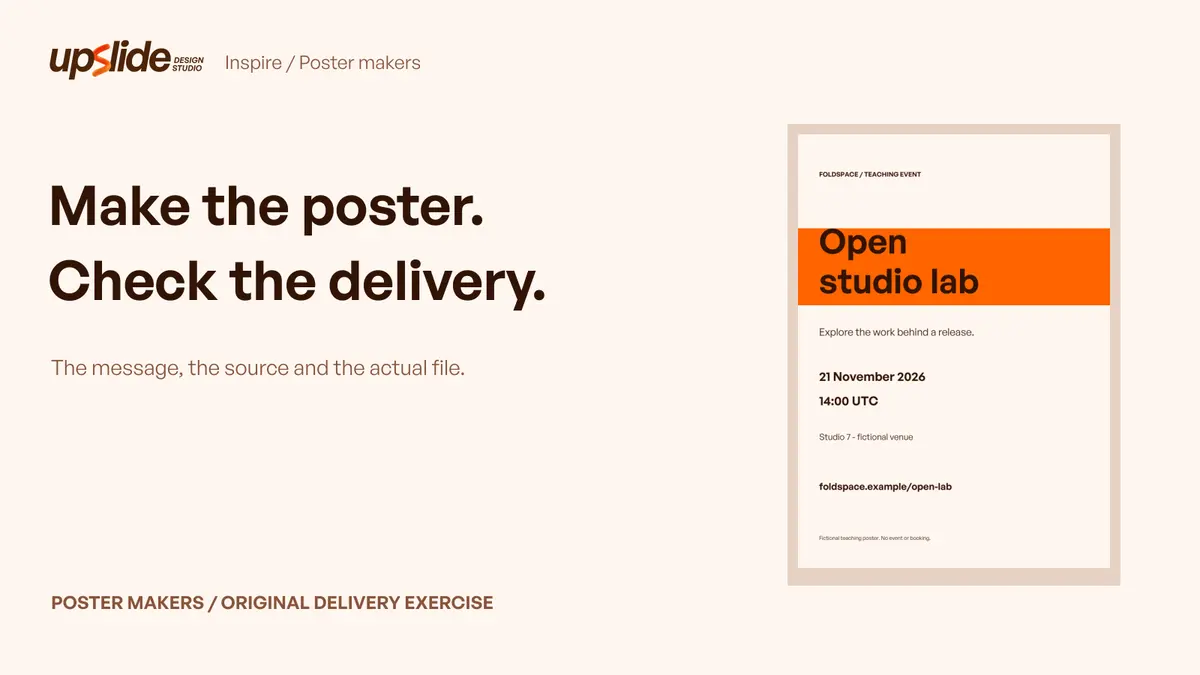
Foldspace’s open studio lab is an original teaching event, not a real booking opportunity. Its poster contains five required fields: subject, date, time, location and next-step address.
The practice contract specifies a 200 × 280 mm trim region, 3 mm beyond each edge and a resulting 206 × 286 mm page. It also proposes keeping essential content 5 mm inside the trim. These are authored exercise values, not recommendations for every printer.
The original PDF was generated locally using ReportLab and the bundled General Sans font. Its page boxes and extracted text were then reopened with pypdf. A separate visual inspection reviewed a rendered image; text extraction alone would not establish the layout.
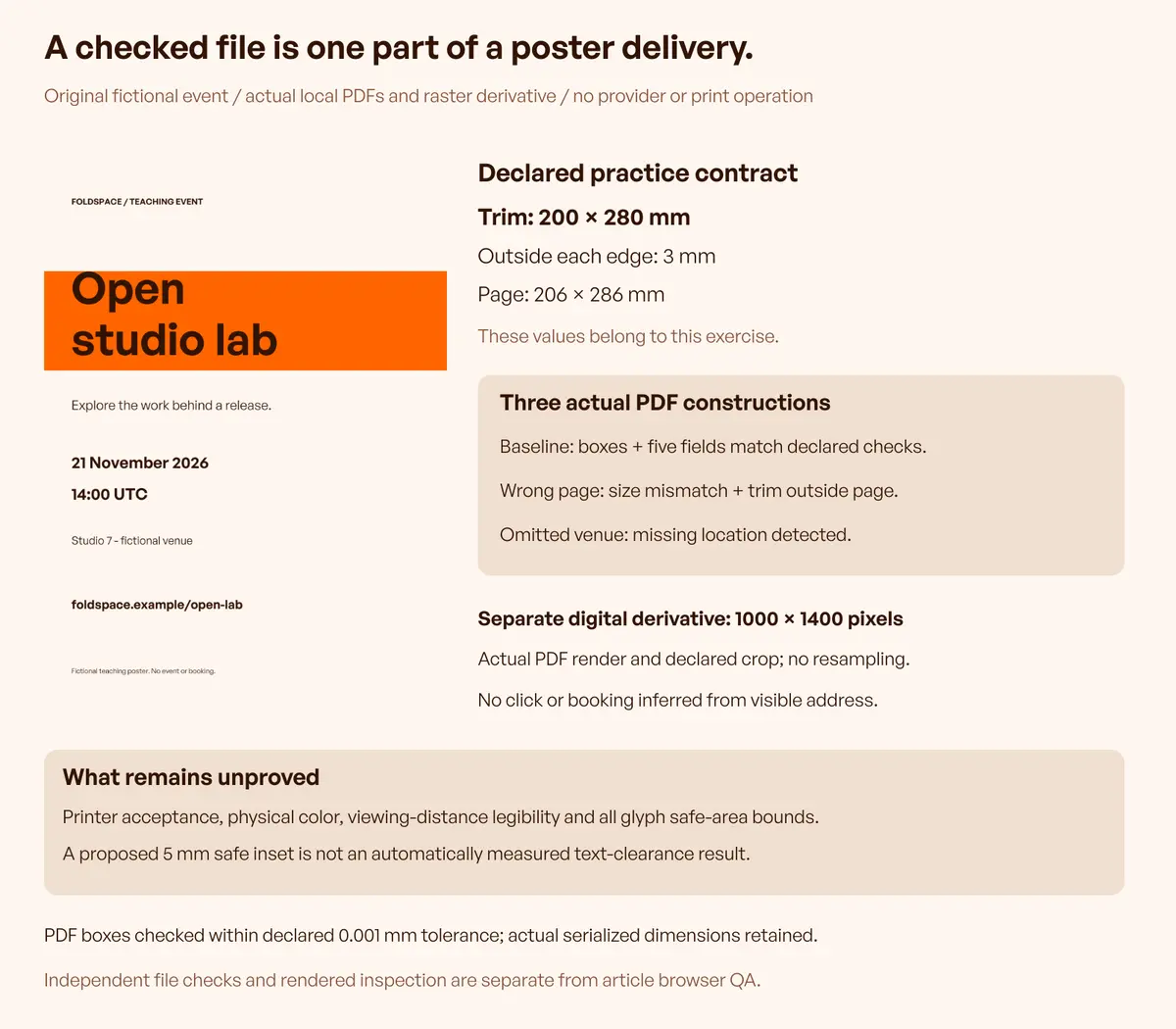
Original Upslide fictional poster and explanatory graphic. Actual local files, not provider exports or a physical print. Declared dimensions and bounded checks demonstrate a receiving contract; they do not certify color, readability or printer acceptance.
Inspect the pass and two deliberate defects
Three PDFs were actually written and reopened. The baseline retains all five required fields and matches the declared boxes within a 0.001 mm numerical tolerance, accounting for serialized decimal precision.
| Authored output | Actual check | Recorded result |
|---|---|---|
| Baseline poster | Page dimensions, trim containment and five text fields | No declared errors |
| Wrong-page variant | A 200 × 280 mm page retaining the larger contract’s trim box | Page-size mismatch and trim outside the page |
| Missing-location variant | Correct boxes, with the venue omitted | Missing location |
The two defective files answer different questions. A dimension check cannot discover a missing venue, and complete wording cannot establish the correct production size. Independent review reopened the original files and checked these declared cases separately.
The proposed safe inset remains a design requirement, not an automatically certified glyph-boundary result. The checker does not establish that every visible mark is inside that region or that the poster can be read from a particular distance.
Generate a separate digital image
The baseline PDF was rendered with Poppler. A declared trim-region crop produced an actual 1000 × 1400 PNG without resampling that crop. The retained record identifies the source, raster dimensions and crop coordinates.
That is a separate digital derivative, not another name for the print file. Its pixel dimensions do not establish an appropriate physical printing scale. No website upload, browser placement or audience interaction was tested.
The PDFs contain no link annotations. Their visible next-step address therefore demonstrates text retention, not an interactive registration route. The image likewise supplies no tested booking behavior.
Retain the decision and its limits
Keep the fictional content record, declared contract, source files, PDFs, digital image and inspection results together. For real work, add the receiving provider’s requirements, accepted proof and any unresolved limitation.
Use Daily Inspire to examine how imagery and supporting information sit within complete pages. Credit the original work; a screenshot does not reveal its export settings or production software.
Frequently asked questions
Which poster maker should a small team choose?
Choose around the required output, next editor’s access and actual account conditions. Canva, Adobe Express and Piktochart provide different documented routes. A familiar tool can remain suitable when it meets the delivery brief and supports the necessary correction.
Can a free poster design always be downloaded as PDF?
No general rule follows from a free entry point. Piktochart’s current help distinguishes limited Free PNG downloads, Pro PNG and Business PDF capabilities. Confirm the selected tool and account before depending on an export format.
Is every PDF ready to send to a printer?
No. Confirm the receiving product’s requirements, inspect the actual file and obtain the appropriate proof. The local example checks declared boxes and text; it provides no physical color or production-quality result.
What bleed should every poster use?
There is no universal value established by this guide. Obtain the selected printer’s specification. The exercise’s 3 mm value belongs only to its fictional contract and must not be treated as a default for every order.
Can a print poster be reused unchanged online?
Create and inspect the actual digital output. The placement, pixel dimensions, surrounding information and available interaction may differ. The example retains the same content in a separate PNG but does not claim suitability for every platform.
Does a website address inside an image become clickable?
The visible text alone does not demonstrate an interaction. Provide and test the destination through the receiving channel. The example’s PDFs have zero link annotations, and no booking or network operation was performed.
Does the original checker approve the poster’s design?
No. It checks three authored PDFs against declared dimensions and text fields, including two deliberate defects. It does not judge comprehension, viewing-distance legibility, all glyph bounds, accessibility or commercial effectiveness.
What should remain after delivery?
Keep the editable source, approved content, actual exported file, receiving requirements, review record and known limitations. Identify which version was distributed so a later correction does not leave an older announcement in circulation.
Key takeaways
- Define the poster’s message and destination before choosing a template.
- Check the actual tool route, account access and export conditions.
- Keep content, structural and visual checks separate.
- Obtain a real receiving specification and review the delivered file.
- Preserve the source and the record needed for the next correction.
We help teams connect visual communication with maintainable production workflows. Explore Upslide’s design services when recurring poster or launch-material problems need to fit a wider design system.