Can you reproduce a gradient after it leaves the generator? A CSS gradient generator is useful when its controls make a visual decision easier and its output remains understandable in the receiving component. The preview alone cannot establish either condition.
This guide compares six public tools through their visible controls and documented output paths. It also includes an original browser exercise showing why an identical gradient can change appearance when a background declaration resets its backing colour.
The handoff needs the gradient, its backing surface and its dependencies. A screenshot preserves only their combined appearance.
Design task
Decide what the generator must produce
A CSS gradient is an image generated by the browser. A linear gradient changes along a line; a radial gradient spreads from a centre; a conic gradient changes around a centre.
A layered composition can combine several images and a base colour.
Those distinctions affect tool choice. A two-colour button needs different controls from a background assembled from several positioned radial layers. A menu labelled “mesh” describes a tool workflow; it does not establish a single native CSS mesh-gradient function.
The receiving surface also matters. A hero, card and narrow button have different dimensions. The same declared direction may create a different visual balance when the box changes shape. Text, borders and neighbouring surfaces add further constraints.
A useful brief records the target component, intended dimensions, gradient type, endpoint colours, transparency and editable output. If the actual need is deciding which colours belong to the interface, start with colour palette tools. A generator can arrange colours without establishing their product roles.
Compare the operation rather than a universal winner
The following matrix groups the tools by the operation visible during review. It is a selection aid, not a scored benchmark. Public interfaces were inspected on 3 November 2026; paid plans, account storage, clipboard copying and downloaded exports were not tested.
| Tool | Useful starting task | Observed control or output clue | Handoff question |
|---|---|---|---|
| CSS Gradient | Adjust stops and alpha in a conventional editor | Linear/radial controls, angle, RGBA and visible CSS | Which property and compatibility declarations will be retained? |
| Josh Comeau’s Gradient Generator | Explore intermediate colours | Colour-space choices, precision, easing and sampled stops | Will the receiving CSS preserve the generated sequence? |
| ColorSpace | Expand two endpoint colours into a directional blend | Two inputs and a displayed five-colour result | Which intermediate stops and direction must survive? |
| Gradient Art | Plan a layered background composition | Layers, properties, variables and code workspace | Which layers, variables and base surface does the composition need? |
| ColorZilla Gradient Editor | Inspect separate colour and opacity stops | Presets, stop tracks, preview and unprefixed CSS | Are the retained stop positions and opacity values explicit? |
| Stefano Merlo’s CSS Gradient Generator | Explore styles and stop positions | Linear/radial/conic/mesh labels, angle and CSS/share controls | What actual CSS implements the chosen style? |
The Resource Box provides the corresponding source entries. The notes below explain why each belongs in this comparison and where its inspected public view stops short of a complete production workflow.
Resource collection
CSS Gradient: visible stops, alpha and output together
CSS Gradient places its colour-stop controls beside a large preview and CSS output. The reviewed interface exposed linear and radial choices, an angle control, stop positions and RGBA values. That arrangement makes the relationship between a selected stop and the output declaration inspectable.
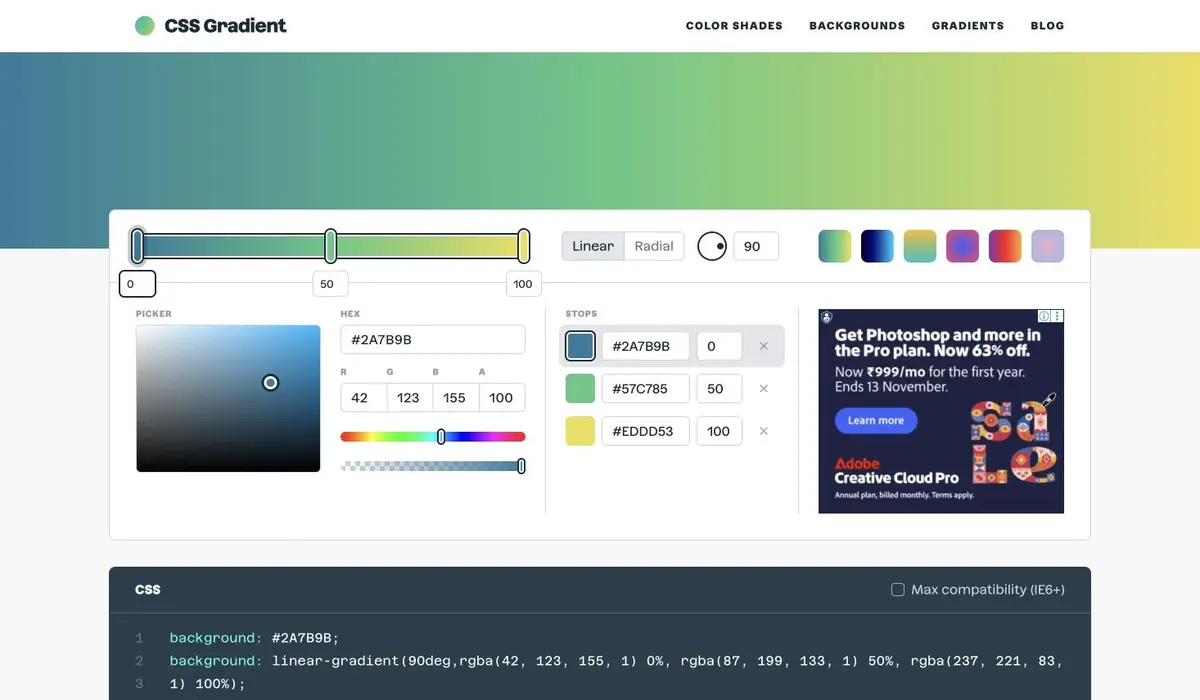
It is a reasonable starting point for a conventional linear or radial surface when the team wants to inspect transparency alongside colour. The public view included advertising; the screenshot records that page rather than a separate paid workspace.
The compatibility checkbox and generated declarations still need an implementation decision. An editor offering extra syntax does not establish the browser requirements of a particular product. The inspection did not demonstrate a conic control, and this guide does not inherit broader feature claims from third-party lists.
For handoff, retain the selected stops and their positions, the direction and the exact property being assigned. A gradient value and a complete background shorthand are different things to insert into existing CSS.
Josh Comeau’s Gradient Generator: inspect the intermediate sequence
Josh Comeau’s Gradient Generator exposes colour-space choices, precision, angle and easing. The inspected default selected HCL; the visible alternatives included LRGB, HSL, HSV and LAB. Its displayed CSS contained a sequence of sampled HSL colour stops.
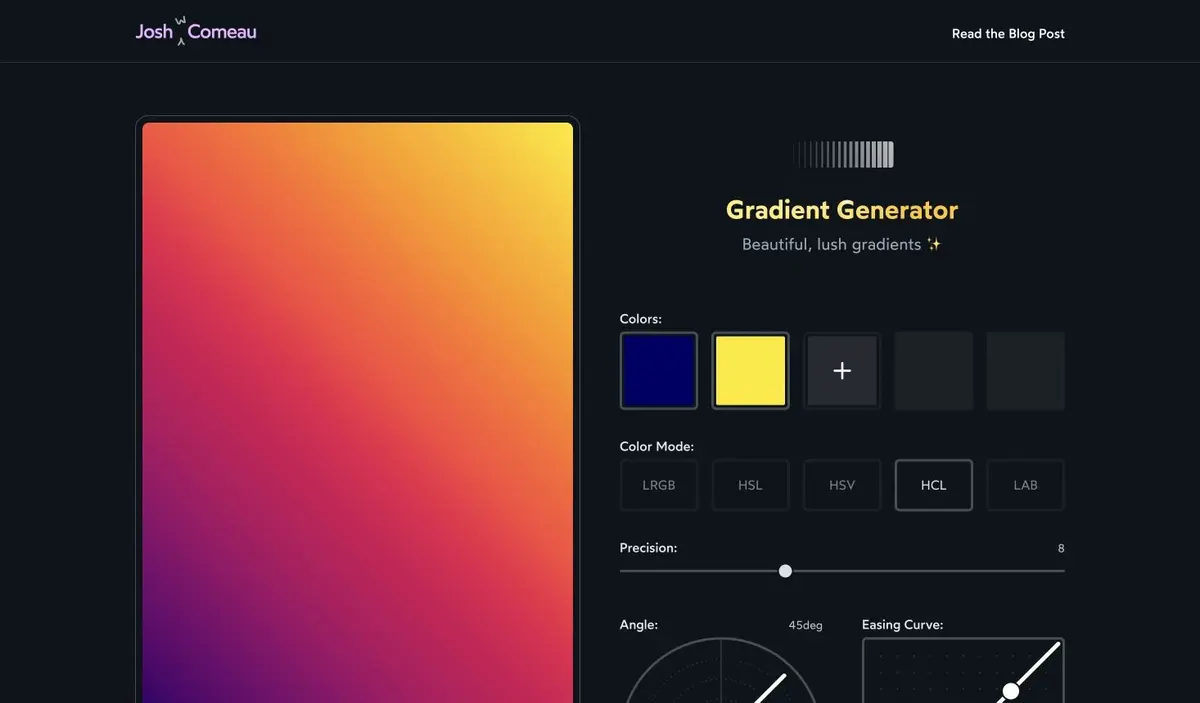
This is useful when the route between endpoint colours needs attention. Two gradients can share endpoints while travelling through noticeably different intermediate colours. A generator can make that path easier to explore than manual editing of several stops.
The editor’s interpolation mode should not be confused with the syntax of its output. Selecting a colour-space label does not prove that the copied declaration uses a native CSS interpolation clause for that space. The reviewed result showed explicit stops; it did not establish a native OKLCH export.
The practical handoff question is whether those intermediate samples survive later simplification. Reducing a generated sequence to two endpoints changes the instruction, even when the first and last colours remain identical. No provider export was pasted into a product during this review.
ColorSpace: two inputs can produce more than two stops
ColorSpace’s gradient tool presents two endpoint colour inputs, direction choices and a Generate control. The inspected result displayed a directional CSS gradient with five colour values. The input model and the generated stop count were therefore different.
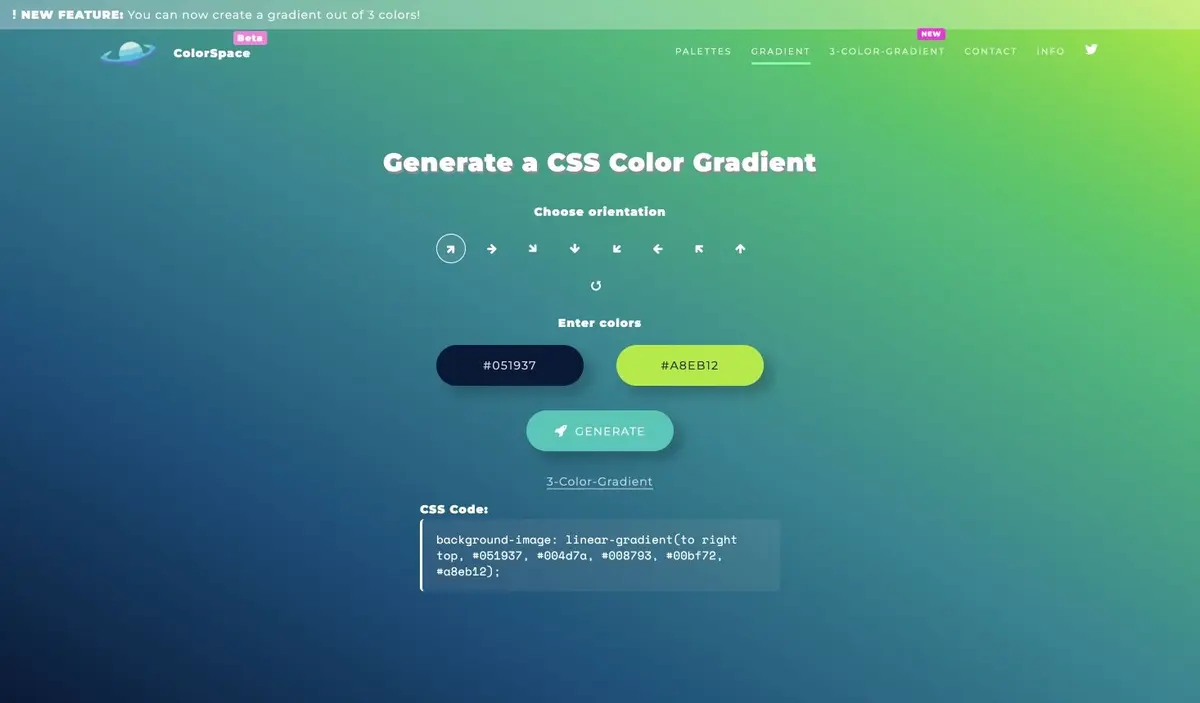
That is a useful starting point for a designer who has selected endpoints but wants a generated transition between them. It also makes a common handoff mistake visible: recording only the two input colours can omit the intermediate colours that shaped the preview.
The reviewed page linked a separate three-colour tool, but that route was not operated. This comparison concerns the two-input gradient page shown here. It does not infer that every ColorSpace mode has the same controls or output.
A handoff record should preserve the displayed direction and full colour sequence. If a developer later substitutes theme tokens for literal values, the revised result needs another visual review in its component.
Gradient Art: treat the background as a composition
Gradient Art describes a visual workflow for layered CSS backgrounds with variables and HTML, CSS and SVG output paths. Its public starting editor exposes Layers, Properties, Variables, History and Code areas. The captured workspace was a blank new project.
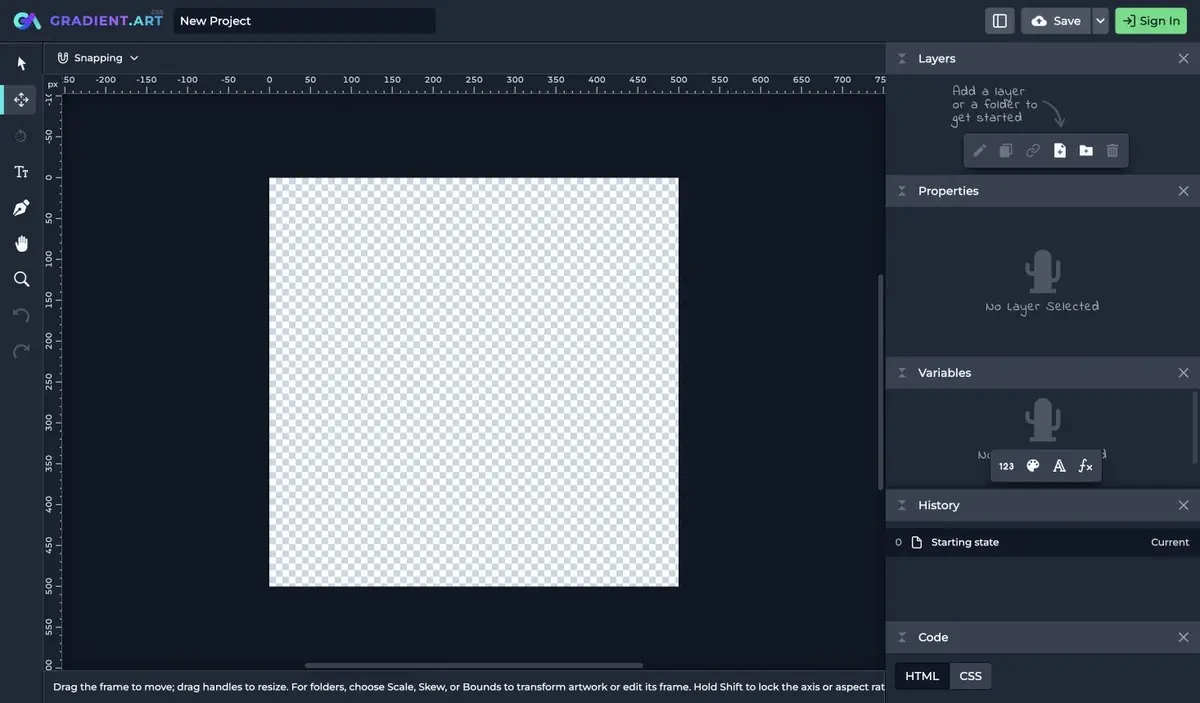
That structure suits a composition problem: several positioned gradients or other supported elements must remain related while the designer revises the scene. A single angle slider is insufficient to describe that editing task.
The screenshot is evidence of the starting workspace, not evidence of a generated composition or completed export. No cloud project was saved, and no account, sharing permission or downloadable artifact was tested. Public documentation of an output path should remain separate from a successful output test.
Before committing a project, determine which variables and layer settings need to stay editable, and whether sharing is appropriate for the material. A flattened image may preserve appearance while losing the controls that made the composition maintainable.
ColorZilla: separate colour stops from opacity stops
ColorZilla’s Gradient Editor exposes presets, stop controls, a preview and CSS output. Its documentation distinguishes colour and opacity stops and describes CSS/image import and permalink features. The public view showed an unprefixed CSS option.
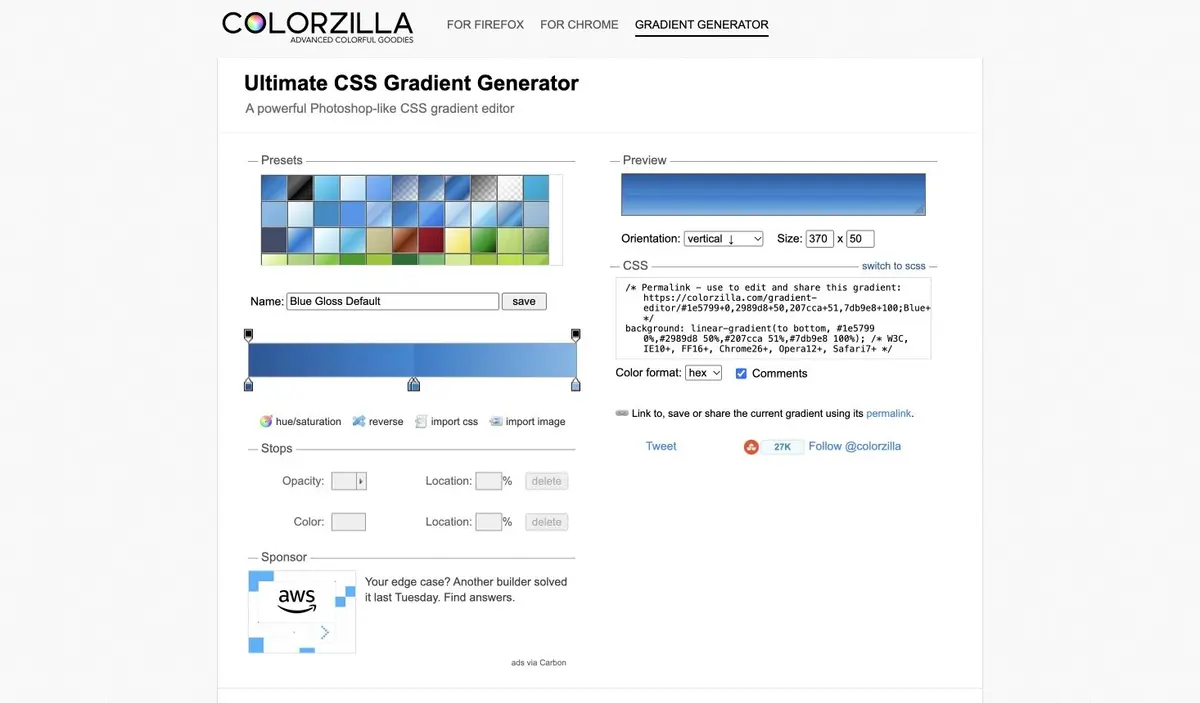
The separate opacity controls are relevant when a gradient must reveal an underlying surface. A colour stop’s location and an opacity change are related visual inputs, but they should not disappear into a screenshot-only specification.
This is the standalone gradient editor. It should not be confused with installing or testing the ColorZilla browser extension. The review did not import an image, generate a saved permalink or validate an old-browser fallback.
Older compatibility explanations on a mature tool page are not a substitute for current product requirements. Keep the actual declaration needed by the application, document any chosen fallback and verify the result where it will run.
Stefano Merlo’s generator: verify what each style emits
CSS Gradient Generator by Stefano Merlo presents linear, radial, conic and mesh-labelled styles alongside angle, colour and stop-position controls. The public page also exposed Copy CSS, Share and a colour-blindness dropdown.
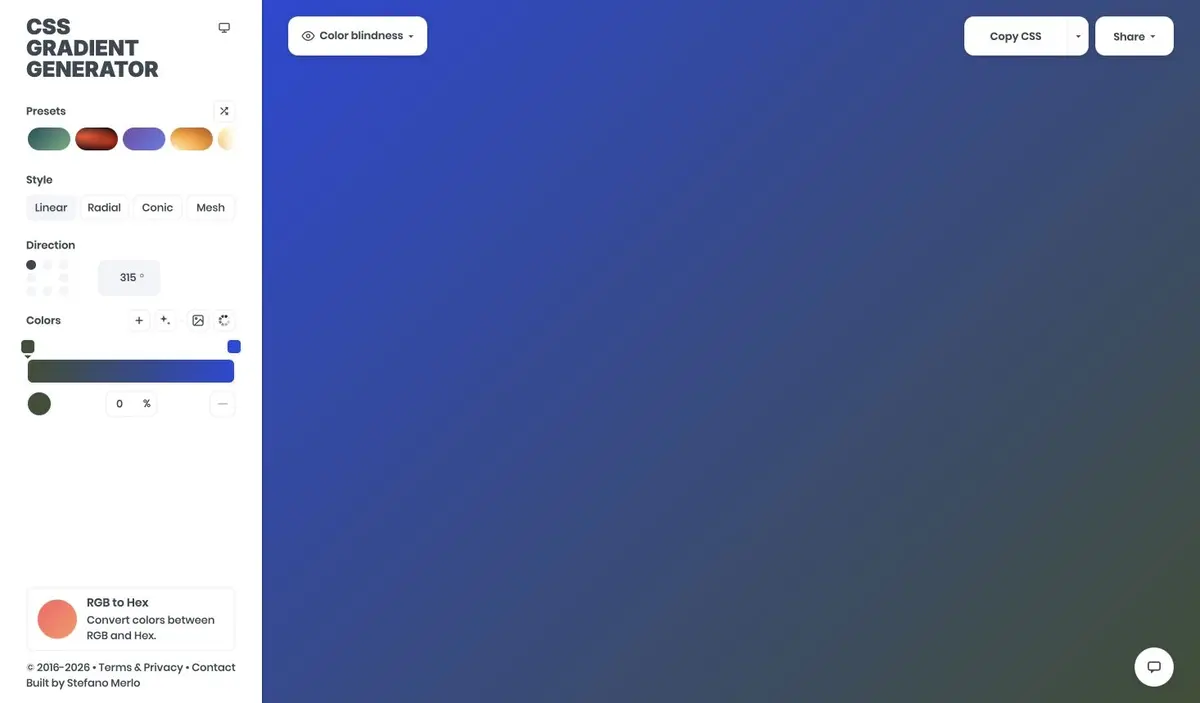
It is a useful candidate when the designer wants to explore several gradient styles from one visible starting interface. Its actual CSS output should determine the implementation description. A style label alone does not reveal whether the result uses one function, several layers or additional dependencies.
The review did not activate every mode, copy an output, test the sharing route or assess the colour-blindness simulation. A simulation control cannot certify accessibility, and a list of supported browsers cannot certify a particular exported declaration.
The delivery question is therefore concrete: after a style is chosen, what declarations and supporting values must the receiving component retain? Record that answer before making a reusable design-system asset.
Fit and limitations
Controls are evidence of an editing path
The six previews are actual public-page captures, attributed to their respective creators. They show what was visible during inspection. They do not establish comparative speed, account reliability, commercial rights over every supplied asset or successful production integration.
These tools also solve different levels of the task. Some expose a small set of stops; another generates a sampled colour sequence; a layered editor manages a larger composition. More controls may be helpful or unnecessary depending on the brief.
Pricing is intentionally not ranked here. The public editing views were available during review, but account entitlements, paid features and regional prices were not established. A “free” label should not replace verification of the exact save, export or collaboration operation a team needs.
A generator cannot validate the receiving interface
A gradient without intrinsic dimensions fills the box where it is used. Shape changes, transparent stops and an underlying image can change the final composition. A pleasing editor preview cannot demonstrate legible copy across the product’s actual layouts.
For text and neighbouring surfaces, use the placement checks in website colour schemes. This guide’s narrower implementation contribution concerns declaration behaviour; it does not repeat a contrast audit or report a measured contrast ratio.
The same separation applies to visual references. Daily Inspire can help a team study where gradients support hierarchy. A credited screenshot does not reveal the source CSS, opacity model or responsive rules behind the example.
How to choose
Run the original backing-colour exercise
An original local fixture used two boxes on a white page. Both contained the same 90-degree linear gradient: a purple endpoint with RGB values 64, 56, 180 and an orange endpoint with values 255, 88, 38. Both endpoints used 35% alpha.
Each box initially declared a cream backing colour, hexadecimal FFE0B2. Case A added the gradient through the background-image property. Case B instead assigned the gradient through a later background shorthand that omitted a colour.
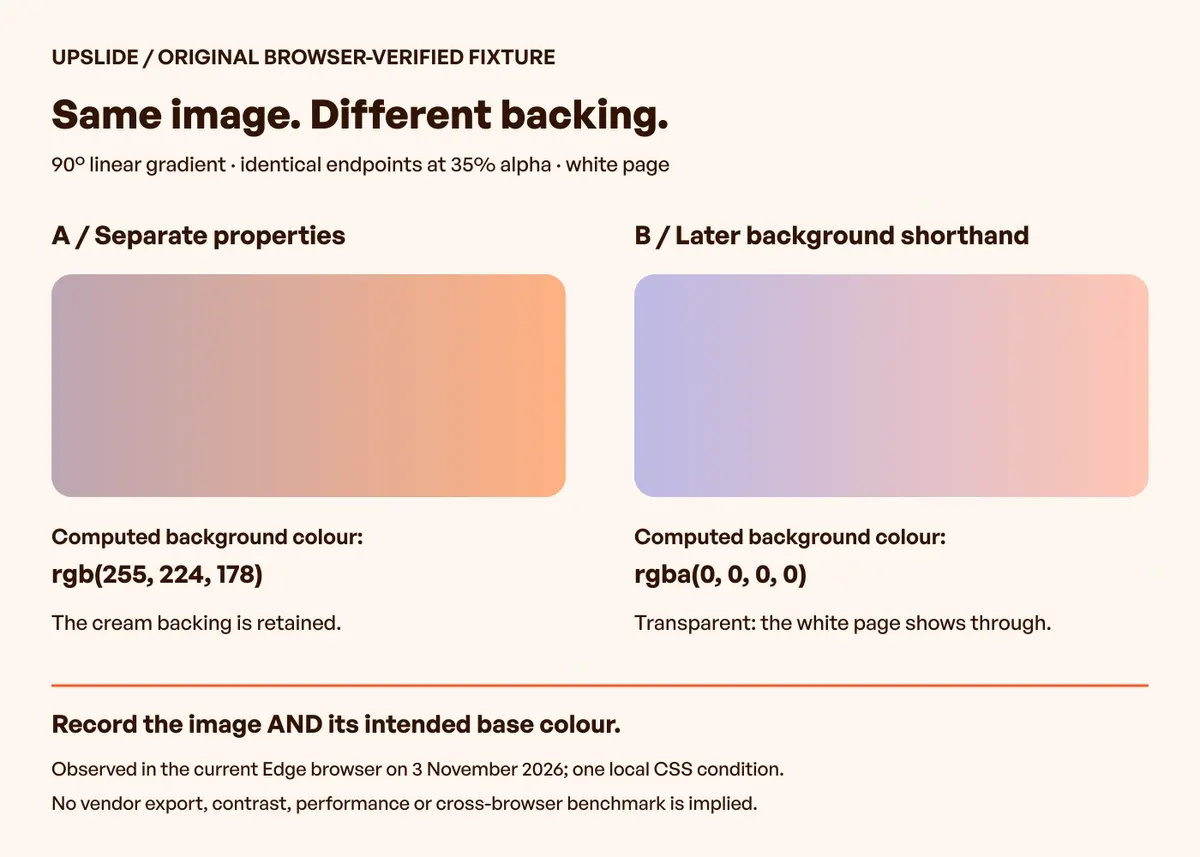
In the current Edge browser on 3 November 2026, both boxes had an identical computed background-image. Case A’s computed background-color remained RGB 255, 224, 178. Case B’s became transparent, represented as RGBA 0, 0, 0, 0; the white page showed beneath its translucent gradient.
That is the whole observed result. It is one local CSS condition, not a vendor-export comparison, cross-browser benchmark or text-readability test. The accompanying graphic explains the condition; the underlying fixture and computed-property record were retained with the research.
MDN’s background reference explains why this happens: the shorthand resets omitted constituent properties, including the background colour. Its linear-gradient reference distinguishes the generated image from a background colour.
The lesson is not that a background shorthand is always wrong. It is that replacing an existing declaration requires knowing which settings it resets. An opaque gradient can conceal this particular colour difference; transparent stops expose the backing surface.
Keep a seven-part handoff record
A small record makes generator output reviewable without preserving every exploratory click. The example below describes the original fixture rather than a client project or a vendor’s exported result.
| Record | Example or decision to retain | Why it matters |
|---|---|---|
| Receiving surface | A component on a white page | The surface behind transparency affects appearance |
| Output property | Background-image in case A | A later shorthand can reset other settings |
| Gradient geometry | Linear, 90 degrees | Direction is part of the image instruction |
| Stops and alpha | Two named endpoints, both 35% alpha | Endpoint hex values alone omit transparency |
| Base colour | FFE0B2 cream | The intended backing must remain explicit |
| Layers and dependencies | One image, no custom properties | Additional layers or variables need their own record |
| Review condition | Current Edge, two 559 by 270 pixel boxes | The observation has a defined browser and geometry |
For another project, replace those values with the actual artifact and environment. If an editor emits several layers, the first listed background image sits above later images; a team should preserve their order as well as their values.
If custom properties appear, record where they are defined. Copying a declaration without its variables may not reproduce the intended image. Similarly, saving only a PNG removes the stops as editable instructions even when the screenshot looks correct.
Select by the next revision that must be possible
For a simple surface, choose a tool whose stops, alpha and direction remain inspectable. For exploration between endpoints, compare the generated intermediate sequence. For layered artwork, decide whether the team needs the editable project, the emitted CSS, a raster asset or more than one of those deliverables.
Then review the chosen artifact inside the receiving component. Check its backing colour, layer order, dimensions, text placement and the CSS rules it replaces. Preserve a fallback deliberately if the product needs one, rather than assuming a generator has chosen the product’s support policy.
An acceptance note can be brief: what was retained, where it was reviewed and what remains untested. That note makes later revisions easier to assess than a claim that the gradient is simply “production ready.”
Frequently asked questions
Which CSS gradient generator is best?
The best fit depends on the operation. Stop and alpha editing, generated intermediate colours and layered compositions require different controls. Choose the smallest workflow that preserves the revisions and output the component needs, then inspect its actual result.
Is a gradient a background colour?
A CSS gradient is a generated image. It can be assigned as a background image, while a separate background colour supplies the surface underneath. That distinction matters when stops are transparent or a declaration is replaced.
Why does a copied gradient look different on a website?
The receiving box may have different dimensions, backing surfaces, layers or CSS rules. The original exercise here demonstrated one cause: a background shorthand reset an earlier cream colour to transparent. It did not test every possible mismatch.
Do two input colours mean the output has two stops?
No. The inspected ColorSpace result displayed five colours from two endpoint inputs, and Josh Comeau’s generator displayed a sampled sequence. Preserve the actual emitted values if their transition is part of the intended result.
Does selecting HCL mean the CSS uses native HCL interpolation?
The selected editor mode and the emitted syntax are separate evidence. The inspected Josh Comeau result showed explicit HSL stops while HCL was selected. Read the generated declaration before describing how the browser will interpolate it.
Is a mesh gradient a native CSS function?
A generator’s mesh label does not establish one native mesh-gradient function. Inspect whether the result is implemented through several gradients, positions, sizes or other supported elements. The required editing record follows those actual dependencies.
Can a gradient generator certify accessible text?
No. Text contrast depends on the foreground and the background beneath its actual placement, including transparency and responsive composition. A preview or simulation control does not certify the interface; inspect the receiving layout and relevant text conditions separately.
Should a team save CSS, an image or the editable project?
Save the form needed for future revision and delivery. CSS retains declared stops and layers; an editable project may retain richer tool controls; a raster image preserves a flattened result. An image alone cannot reconstruct all original editing decisions.
Key takeaways
- Select a CSS gradient generator by the editing operation and artifact the team needs.
- Preserve generated intermediate stops, alpha, direction, layer order and dependencies.
- Treat the editor’s preview and colour-space labels separately from the actual CSS syntax.
- Record the backing colour: an omitted value in a later background shorthand can reset it.
- Review the result in its receiving component before accepting the handoff.
If the recurring problem is translating visual treatments into maintainable SaaS components, we can help through Upslide’s UI/UX design services. The same acceptance record should remain visible to the team.