


Do you need an image encoded as text, a complete data URL for a page, or a normal link to a hosted file? Those outputs can look interchangeable in a handoff while asking the receiving system to do different things.
An image to Base64 tool represents supplied bytes using a text alphabet. It does not automatically resize the picture, upload it somewhere useful or determine which representation the recipient accepts.
This guide compares three relevant routes and uses an original three-file experiment to separate file identity, encoded length and image pixels. The aim is a usable export contract for designers and developers, with a clear way to check what arrived.
Name the required representation, then verify the bytes it carries. A successful decode and a familiar preview answer different questions.
Design task
Identify what the receiving field expects
“Send the image as Base64” leaves several decisions open. A field might require only the encoded payload, while an image source needs a complete data URL. Another interface may expect an external resource address and reject embedded data entirely.
Ask for the destination’s documented input and a permitted example. Identify whether the image is supplied as a file, as encoded bytes inside a structured request, or through an address the recipient retrieves.
| Representation | What it supplies | Decision to confirm |
|---|---|---|
| Raw Base64 | A text representation of the supplied bytes | Where the image type and other context are declared |
| Data URL | A declaration followed by inline data | Whether the receiving field accepts this form |
| External image URL | An address from which an image may be retrieved | Access, response and maintenance requirements |
| HTML or CSS snippet | A larger expression containing an image reference | Where it belongs and which surrounding syntax is required |
Copying the entire snippet into a field that expects only raw Base64 adds unrelated syntax. Removing the declaration from a field that requires a data URL leaves it without the expected structure.
Separate representation from image editing
Encoding a file’s existing bytes is a different operation from editing the image and then encoding a new export. The second route may be appropriate, but it needs an explicit record of the changes.
A tool might resize an image, change its encoding or remove metadata before producing Base64. A preview that looks familiar does not establish that the original file survived unchanged.
Keep the approved source separate from the encoded deliverable. When the team needs an editable design rather than a delivery representation, the published graphic-design software guide addresses that earlier choice of working environment.
Define the acceptance contract
A short contract can state the input file, expected representation, image type, permitted transformations and receiving system. Add the identity check that matters: exact file bytes, decoded image properties, or both.
For a self-contained review file, the team might require a small approved illustration embedded in the document. For an integration, the requirement could be a raw string accompanied by a separate media-type field. Neither task implies that every website image should be embedded.
Resource collection
Choose between an explicit recipe and a dedicated image entry
These three resources offer different starting points. The public pages and official documentation were inspected on 4 November 2026; no provider received or processed the original fixture.
| Resource | Useful role | Main qualification |
|---|---|---|
| CyberChef | An inspectable sequence of byte transformations | Input bytes, selected alphabet and recipe operations |
| Base64.Guru | An image-focused encoder with several output forms | Source route and requested output wrapper |
| Cloudinary | A dedicated image-to-Base64 entry with image-processing controls | Whether any re-encoding precedes the text encoding |
The comparison concerns those routes. It does not rank their speed, certify their handling of private material or demonstrate every account’s conditions.
Use Resource Box to reach the official destinations and return to the selected route when the requirement changes.
CyberChef: make the byte operation explicit
CyberChef provides file input, an operations list, a recipe area and output. Its official To Base64 operation accepts byte data and produces a string, with an alphabet setting available in the operation.

That makes it a useful candidate when the team wants to distinguish loading a file from typing a text value. The recipe should encode the actual image bytes; typing the image’s address instead encodes that address unless a separate retrieval operation occurs.
Official help describes browser-side processing and a downloadable standalone version. It also names operations that make external requests. Processing claims therefore need to follow the selected operation, rather than the broad application name.
Recipes and links can include input. Check what a shared link contains before distributing it. This review inspected the public interface and source documentation; it did not run a recipe, download the application or audit its network activity.
Base64.Guru: select the output wrapper deliberately
Base64.Guru’s image encoder offers local-file and remote-URL source routes, along with selectable output formats. Its examples distinguish plain Base64, a data URL, HTML, CSS and structured-text representations.

That variety is useful when the receiving context is already known. It also creates a reason to identify the chosen output in the handoff, rather than send a string labelled only “converted image.”
The page describes content-type detection. That is a provider capability statement, not a result verified with the original files here. Check the actual declaration and destination instead of treating the example output as universal validation.
A remote-URL source is also a separate operation from encoding the literal address as text. No file, remote retrieval, detection result or generated snippet was tested for this comparison. The public examples do not establish acceptance in a particular browser, email client or application.
Cloudinary: inspect image processing before the Base64 step
Cloudinary’s image-to-Base64 entry distinguishes raw Base64 from a complete data URL. The page documents format and quality options that can re-encode the image before producing the text representation.

Those controls matter when the brief requires exact file identity. Encoding the bytes of a new image export can be successful while producing a result different from the received source.
For a preparation task, that difference may be intentional. Record the chosen image operation separately from the Base64 step, and retain the exported binary file when it needs independent approval.
No upload or generated result was tested here. The public entry and documentation describe the offered route and options; they do not establish a particular output’s identity, account entitlement, processing location or delivery performance.
Fit and limitations
Treat the declaration and payload separately
The data URL syntax defined in RFC 2397 combines a media declaration, an optional Base64 marker, a comma and the data. The PNG Base64 prefix used in this guide contains 22 characters before its payload.
That prefix supplies context. It does not convert the payload into the declared image type or replace a missing image decoder. A correct representation still needs suitable bytes and a receiving system that accepts the form.
MDN’s FileReader reference explains that reading a file through its data-URL method produces the combined representation. The declaration must be removed before that result is passed to a decoder expecting only raw Base64.
Keep that boundary visible in documentation. A receiving field should not have to guess whether the sender included the wrapper, a quoted value or an entire HTML element.
Do not infer file identity from appearance
Two image files can decode to the same pixels while carrying different metadata. Their Base64 strings can therefore differ even when the displayed image looks the same.
The converse also matters: a tool can preserve a valid image while changing details the brief required it to retain. Define which properties matter before choosing a preview as the acceptance check.
Encoding as text also does not make an image editable as separate illustration objects. For that requirement, continue with the published editable-illustrations guide. File packaging and artwork structure remain separate decisions.
Keep destination behaviour outside the encoding claim
A byte-identical round trip proves a narrow result. It does not establish how a content editor sanitizes the value, which image forms an email client displays, or what a page’s policy permits.
Likewise, a string being longer than its input is not a measured page-loading result. Document structure, requests and the actual receiving environment affect delivery. This guide does not offer a performance, caching, privacy or security guarantee for inline images.
Use the destination’s documented contract and inspect the actual result when that test is required. A provider’s public preview cannot perform that check for another application.
How to choose
Follow three complete files through the original experiment
The original experiment used three locally constructed, valid 2 × 2 RGBA PNG files. They share the same image header and compressed pixel data, while a text-metadata value contains zero, one or two bytes. Each construction includes the corresponding valid chunk checksum.
The metadata difference produces three file lengths without changing the image data. A separate sharp decode of the actual PNGs confirmed identical decoded pixel hashes, with two-pixel width, two-pixel height and four channels in every case.
Each complete PNG was then Base64-encoded in Python, decoded with strict validation and compared with its source using SHA-256. The data-URL declaration was counted separately from the raw payload.
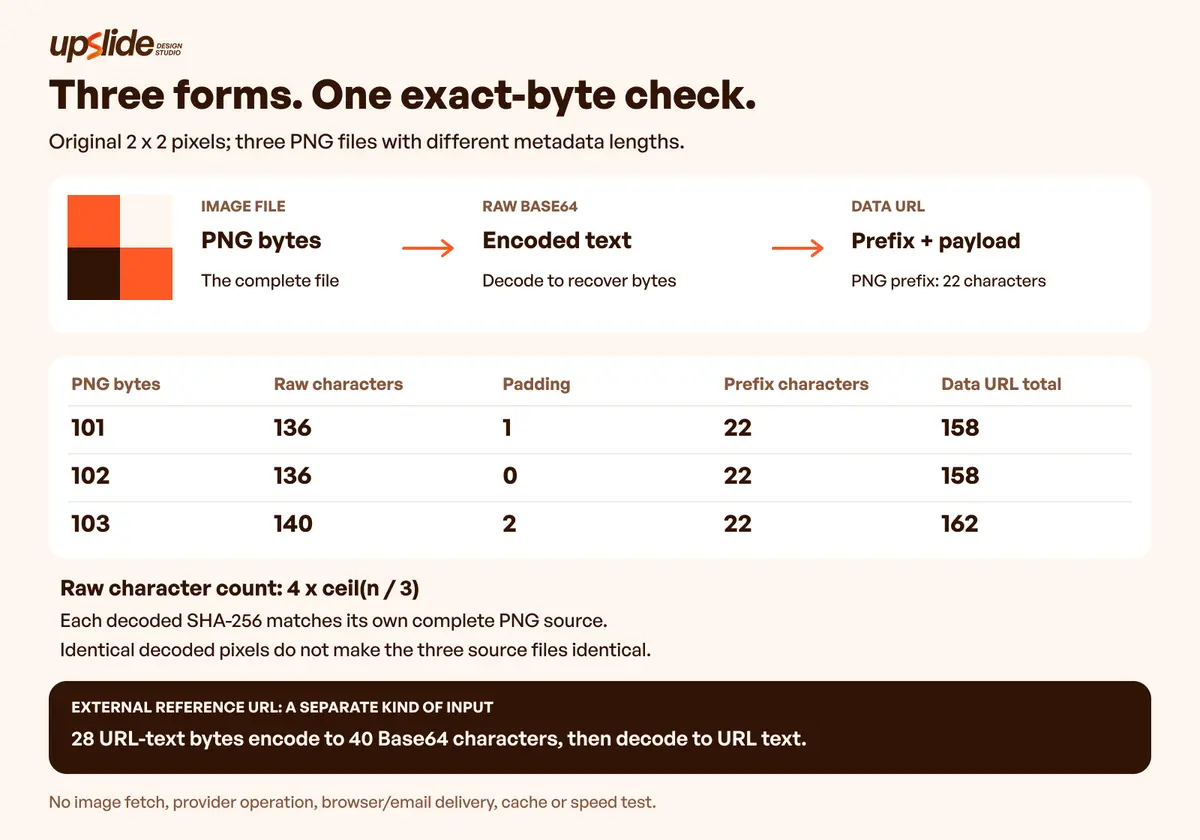
| Original PNG bytes | Raw Base64 characters | Ending padding characters | Complete data URL characters |
|---|---|---|---|
| 101 | 136 | 1 | 158 |
| 102 | 136 | 0 | 158 |
| 103 | 140 | 2 | 162 |
Inspect the original 101-byte PNG, 102-byte PNG and 103-byte PNG used in the experiment.
All three decoded files exactly matched their respective original file hashes. The three original files had different hashes, while their decoded pixels shared one hash. Those are complementary observations about file contents and image data.
This is a small teaching construction. It does not establish any provider’s result, compare compression quality or measure loading time. No file was uploaded to the three listed services.
Explain the length steps without turning them into a quality score
RFC 4648’s Base64 description groups three input bytes into four output characters. With standard padded Base64, the raw character count follows three steps: divide the input-byte count by three, round any fractional result up to a whole number, then multiply by four.
That explains why 101 and 102 bytes both produced 136 characters. The first needed one ending padding character; the second filled its final group. At 103 bytes, another group was required, producing 140 characters with two padding characters.
The complete PNG data URL added the same 22 characters to each result. Surrounding HTML, CSS or JSON would introduce its own syntax beyond those counts.
Padding is part of the chosen encoding contract. Other protocols can define different rules, so removing ending characters merely to shorten an export is not a reliable adaptation. Check the recipient’s specified alphabet and padding expectations.
Distinguish an image’s address from its bytes
The experiment also encoded a literal example image address as UTF-8 text. Its 28 input bytes produced 40 Base64 characters. Decoding returned the same 28-byte address, without a PNG signature.
No HTTP request occurred. The result was the textual reference, not the image that a server might return at that address.
This is a useful input check when an API or converter accepts pasted values. Establish whether it treats the value as literal text, retrieves a remote resource, or requires a local file. Those routes can need different permissions and produce different bytes.
Check identity after checking syntax
Strict decoding helps identify some damaged or unexpected inputs. It is not an identity check: a string truncated at a complete four-character group can remain decodable while representing fewer bytes.
For exact preservation, compare the decoded output with the approved original using a recorded hash or direct byte comparison. For an intentional re-export, compare it with the approved new binary output rather than pretending the earlier file should remain identical.
The fixture establishes exact matches for its three complete payloads. It does not certify malformed-input handling across tools or prove that every copied value reaches its recipient unchanged.
Keep a small export record
A usable handoff can be concise while retaining the decisions needed for correction.
| Record field | Useful content |
|---|---|
| Source | Approved file identity and known provenance |
| Operation | Exact encoding route and any prior image transformation |
| Representation | Raw payload, complete data URL or another requested form |
| Context | Media declaration, alphabet and required padding rules |
| Verification | Decoded length, comparison result and destination check |
| Maintenance | Source owner and procedure for replacing the image |
Recheck after a source replacement or an integration change. If a copied value is incomplete, return to the saved export instead of reconstructing missing characters from a screenshot.
Use Daily Inspire to discuss an image’s visual role, placement and hierarchy. A website preview does not reveal whether its creator embedded the image or served it through an external address.
Frequently asked questions
Does converting an image to Base64 compress it?
Base64 represents bytes as text. An image tool can additionally compress or re-encode the picture before that step, but that is a separate operation. Record it when comparing the result with the source.
Is raw Base64 the same as a data URL?
Raw Base64 is the encoded payload. A data URL adds a declaration and separator around its inline data. Use the form required by the destination field.
Why can two different files produce strings of the same length?
Standard padded Base64 works in groups. In the original experiment, 101-byte and 102-byte PNGs both produced 136-character payloads, with different padding. Equal length did not mean equal contents.
Does a successful decode prove that the whole image was copied?
No. Some incomplete strings remain valid Base64. Compare the decoded bytes with the intended source when exact preservation matters, then check the receiving system separately.
Can an image URL simply be Base64-encoded instead of the file?
That encodes the address unless a separate operation retrieves the image. The original literal-address test decoded back to text and performed no request. Confirm which input the receiving workflow needs.
Can the pixels stay the same while the file changes?
Yes. The three constructed PNGs have different text metadata and file hashes, but their separately decoded pixels match. A visual check and a byte-identity check therefore establish different facts.
Does Base64 make an image private?
It provides a reversible representation, not a handling policy. Check the selected operation, permitted input and sharing route. A text string can still contain the complete image data.
Should every website image become a data URL?
Choose the representation around the actual destination and maintenance requirement. This experiment supplies no universal performance rule. Keep an external image reference when that is the established contract, and verify inline delivery where it is specifically needed.
Key takeaways
- Specify raw Base64, a complete data URL or an external image reference.
- Separate image transformations from the byte-to-text encoding step.
- Count payload, declaration and surrounding syntax deliberately.
- Verify file identity independently of visual appearance and decoder acceptance.
- Preserve the approved source and an accountable replacement process.
We help teams make visual production and development handoffs easier to maintain. Explore Upslide’s design services when recurring asset-delivery decisions need to fit a broader website or product workflow.


