When you reduce a product video's size, does it still explain the product clearly, or did the file merely get under the upload limit?
A reduced file size is useful evidence. It does not prove that interface labels, a moving pointer or the required sound survived appropriately. A video can also become smaller because it was shortened, resized or stripped of audio, which changes the comparison.
For designers and SaaS founders, define the receiving requirement first. Then choose a compression route and inspect the actual output against the explanation the video must preserve.
This guide compares six documented routes and two actual local re-encodes of an original synthetic recording. Sources were checked during 2–3 November 2026 in India. This is not a six-service speed benchmark, an equal-quality codec test or a guarantee that an MP4 will play in every destination.
Accept the smaller file and the retained explanation separately.
Design task
Name the constraint that requires a smaller copy
A finished walkthrough might need to fit an upload form, move through a review process or appear on a page. These jobs do not necessarily require the same file.
Record the actual constraint instead of copying an attachment limit from an old blog. Specify the accepted format, maximum size if one exists, receiving environment and content that must remain understandable.
| Requirement | Question to answer |
|---|---|
| Size | Is there a strict byte limit or simply a preference for a smaller file? |
| Picture | Which labels, details and movements must remain clear? |
| Sound | Which audio tracks are required, and what must remain understandable? |
| Sequence | Must the duration and complete demonstration stay unchanged? |
| Delivery | What actual file and playback environment will receive the result? |
| Source | Which maintained master will be retained for the next version? |
Keep an appropriate source master. Repeatedly compressing the latest delivery copy can compound changes without restoring information removed earlier. The accepted source and the small delivery derivative have different maintenance roles.
Distinguish compression from changing the explanation
Removing an unnecessary introduction can be a good editorial decision. It is still different from comparing two encodes of the same accepted sequence.
Likewise, a lower-resolution export contains fewer picture pixels. Removing an audio track can reduce size while deleting useful information. Record these changes explicitly rather than crediting every smaller result to a better compression setting.
This article starts with an existing video. It does not choose scene-generation tools, record a live demonstration or assemble an editing timeline. Those steps can precede compression without answering whether the final reduced file meets its receiving requirements.
Resource collection
Compare six routes by the control they expose
The shortlist contains documented compression and transcoding routes, rather than filling a list with unrelated video-generation features. It does not rank providers by an unperformed quality test.
| Resource | Useful route | Qualification to retain |
|---|---|---|
| HandBrake | Desktop transcoding with presets and quality controls | Actual source/output tracks and a reviewed short preview |
| FFmpeg | Scripted encoding with explicit stream selection | Installed build, commands, codecs and actual output properties |
| Shutter Encoder | Desktop encoding interface with bitrate and size controls | Requested size is an attempt, not a guaranteed exact result |
| FreeConvert | Online quality, size-target, bitrate and resize choices | Upload conditions and server conversion minutes |
| VEED | Dedicated compressor with estimates and further editing | Actual free/paid output route and downloaded size |
| Kapwing | Compression controls within an editing/export workspace | Account limits, watermark and requested output format |
HandBrake: preview the source you actually have
HandBrake's overview describes a free, open-source desktop transcoder for Windows, Mac and Linux. Its about guide distinguishes converting existing videos from maintaining a general editing timeline.
The quality-control guide explains adjusting quality and checking a short encoded preview. That is a useful route when a team wants a repeatable local conversion without uploading the source to a browser service.
Choose the relevant preset and inspect the actual audio, subtitle and picture decisions. A preset name alone does not describe every source track or guarantee the receiving application's behavior.
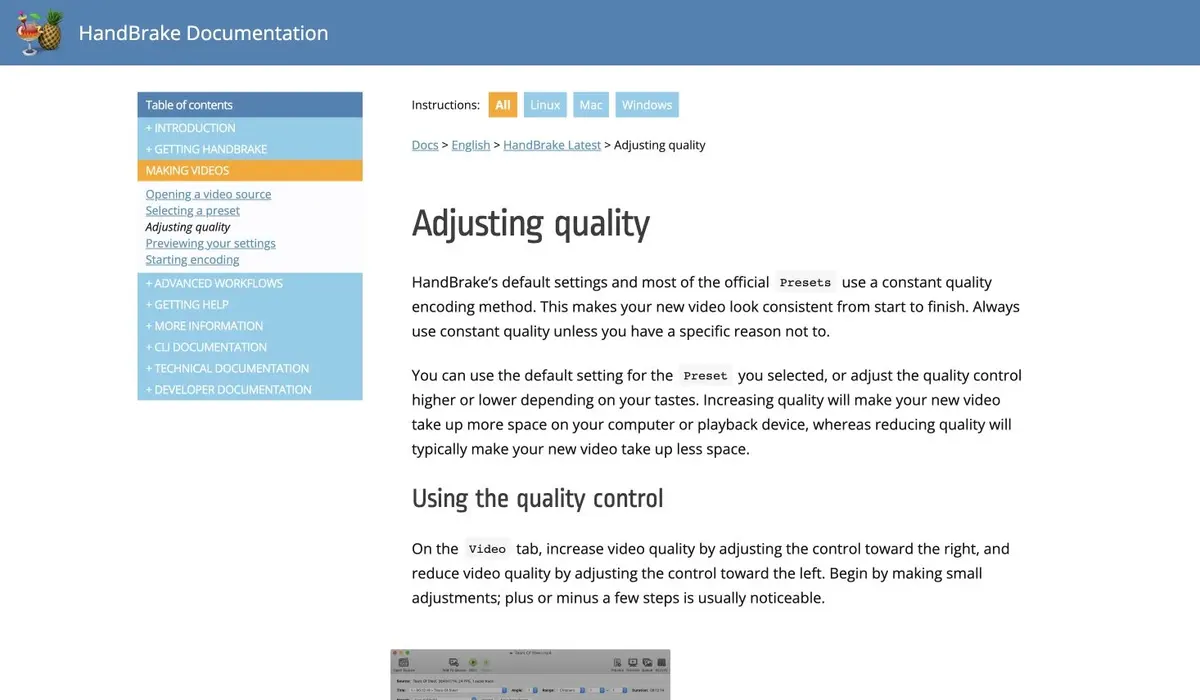
Credit: HandBrake contributors. Actual public documentation, not an encoding performed in the HandBrake application by Upslide.
Do not interpret a quality setting as an exact output-size request. Test representative motion, interface text and sound. Keep the selected settings with the accepted output so the next maintainer can understand what was changed.
FFmpeg: make the command and build part of the record
FFmpeg is a command-line media conversion framework. Its current command documentation describes inputs, output streams, transcoding and explicit stream selection.
It is relevant when a repeatable operation should be inspectable as a command. That control also creates responsibility: a command can omit a required track, change dimensions or select a different encoder than the operator intended.
Check the actual executable and build capabilities. Do not assume that a command copied from a tutorial runs with every installed package. Record the output file's properties and inspect playback, rather than treating a successful process exit as complete acceptance.
FFmpeg's licence page distinguishes its base licence from optional components that affect the applicable terms. Check the actual build and distribution requirements when incorporating it into a product; this guide does not issue a blanket licence clearance.
We used one installed FFmpeg executable for the original exercise below. That limited local operation is identified precisely and does not imply that every other resource in this comparison was tested.
Shutter Encoder: requested size and achieved size differ
Shutter Encoder is a free desktop conversion application built around FFmpeg. Its interface is relevant when the operator wants encoding controls without composing every operation directly at a command line.
Its documentation distinguishes bitrate modes, quality controls, audio mapping and a file-size field. Importantly, it says that the encoder attempts the requested file size and cannot guarantee a perfect result.
That distinction belongs in the acceptance record. A number typed into a target field is a request; the resulting file's measured byte count is evidence of what was delivered.
Investigate the audio mapping and actual output destination too. An encoding interface can expose more controls than a particular job needs, but using a preset does not remove the need to verify which tracks and dimensions survive.
This guide does not claim a Shutter Encoder installation, completed conversion or performance advantage. The published controls establish a route to evaluate, not an automatic win over another interface.
FreeConvert: separate video minutes from conversion minutes
FreeConvert's video compressor exposes different methods, including a size target, quality setting, bitrate controls and resizing. These answer different requirements; changing the picture dimensions is not the same operation as keeping dimensions while adjusting compression.
The source also contains broad statements about exact size and playback support. Treat the actual result and receiving environment as the acceptance evidence instead of adopting a universal guarantee.
Current pricing explains conversion minutes as server processing time. They are not simply the duration of the uploaded video. Upload caps, per-file processing allowances and an account's other limits need separate checking.
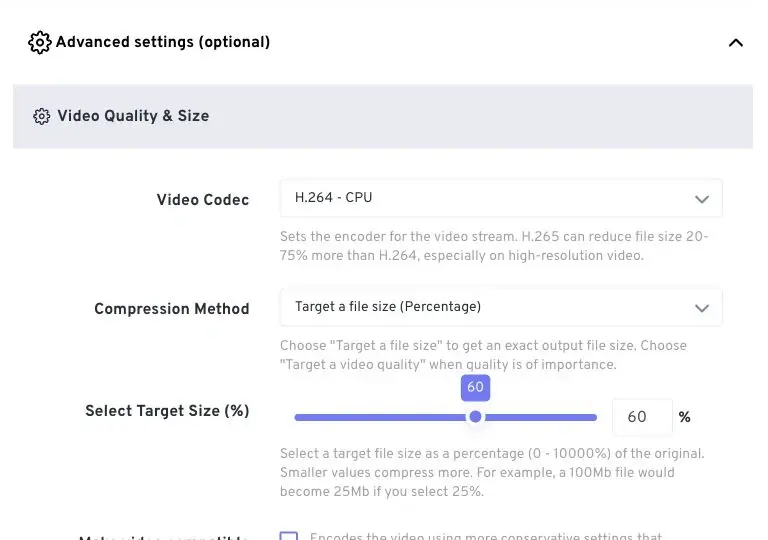
Credit: FreeConvert. Actual public settings page; no file was uploaded, processed or downloaded through this service by Upslide.
For a regular workflow, check a representative permitted file and record what the actual job consumes. This comparison supplies no inferred files-per-day capacity or guarantee that a target-size method preserves the detail a product walkthrough needs.
VEED: use the dedicated compression route deliberately
VEED's compressor documents quality and resolution controls with estimated file sizes. It also provides a route to continue editing or use hosted sharing after compression.
That is useful to investigate when reducing size is part of an existing browser production workflow. Keep the requested operation clear: compression, resizing and editing the sequence should not become interchangeable explanations for a smaller result.
The current compressor FAQ distinguishes free input conditions from paid access for larger files, other editing features and watermark-free exports. Check current pricing and the actual download route before relying on a free preview for a finished delivery.
An estimate displayed before export is not the final byte count. Download the required artifact, check its actual size and inspect the important content. Provider statements about invisible loss, upload speed or website performance are not measured results from this guide.
Kapwing: inspect compression and the account's export
Kapwing's compressor documents a compression-level control and resolution selection in its export workflow. It also describes estimated size and an editing workspace around the operation.
Its current FAQ explicitly says free exports from this tool carry a watermark. Check the current plan against the actual file, duration, resolution and delivery requirements rather than importing a comparison blog's quota figures.
Credit: Kapwing and displayed creators. Actual public provider page, not a compressed output or account test completed by Upslide.
Name the requested file type and inspect the resulting artifact. The page discusses conversion as well as compression, so do not assume that the container, audio or other properties remain unchanged merely because the source opens successfully.
We do not resolve conflicting allowance descriptions by choosing the most generous number. Confirm the actual workspace and output gate before committing a recurring job to it.
Fit and limitations
A small file is not a quality measurement
Inspect the parts that carry the explanation: a changed status, a product name, an important cursor movement or a meaningful sound. A size reduction can be acceptable for one placement and inadequate for another.
Keep a comparison honest by naming what stayed fixed and what changed. Use the same source and sequence when investigating an encoding setting. Record changes to dimensions, frame rate, audio and content rather than hiding them inside a compression percentage.
No universal quality score is supplied here. We do not measure viewer comprehension, rank six encoders or claim that one example establishes a general codec advantage.
The receiving environment is another check
A filename ending in MP4 does not fully specify the streams and settings inside it. A successful local decode does not certify playback on every browser, device or sharing service.
Open the actual result where it will be used. Check startup, the complete sequence, important picture details and sound. Keep subtitle requirements separate if the destination also needs a selectable text track.
For an online route, review the upload and processing arrangement before sending sensitive material. For a local route, review any configured external destinations and integrations. An interface category alone is not a complete account of where a particular operation sends data.
How to choose
Inspect two actual local re-encodes
We reused our original fictional Frame Desk canvas recording as a declared source. It contains a moving square, readable interface-style text and deliberately synthesized sound. It is not footage of a real product, a person's narration or a customer recording.
One installed FFmpeg 7.1 executable re-encoded the complete source twice using the same H.264 encoder, preset, picture dimensions and audio settings. We changed the chosen video-quality setting between two teaching cases. These settings are examples, not recommended defaults for every video.
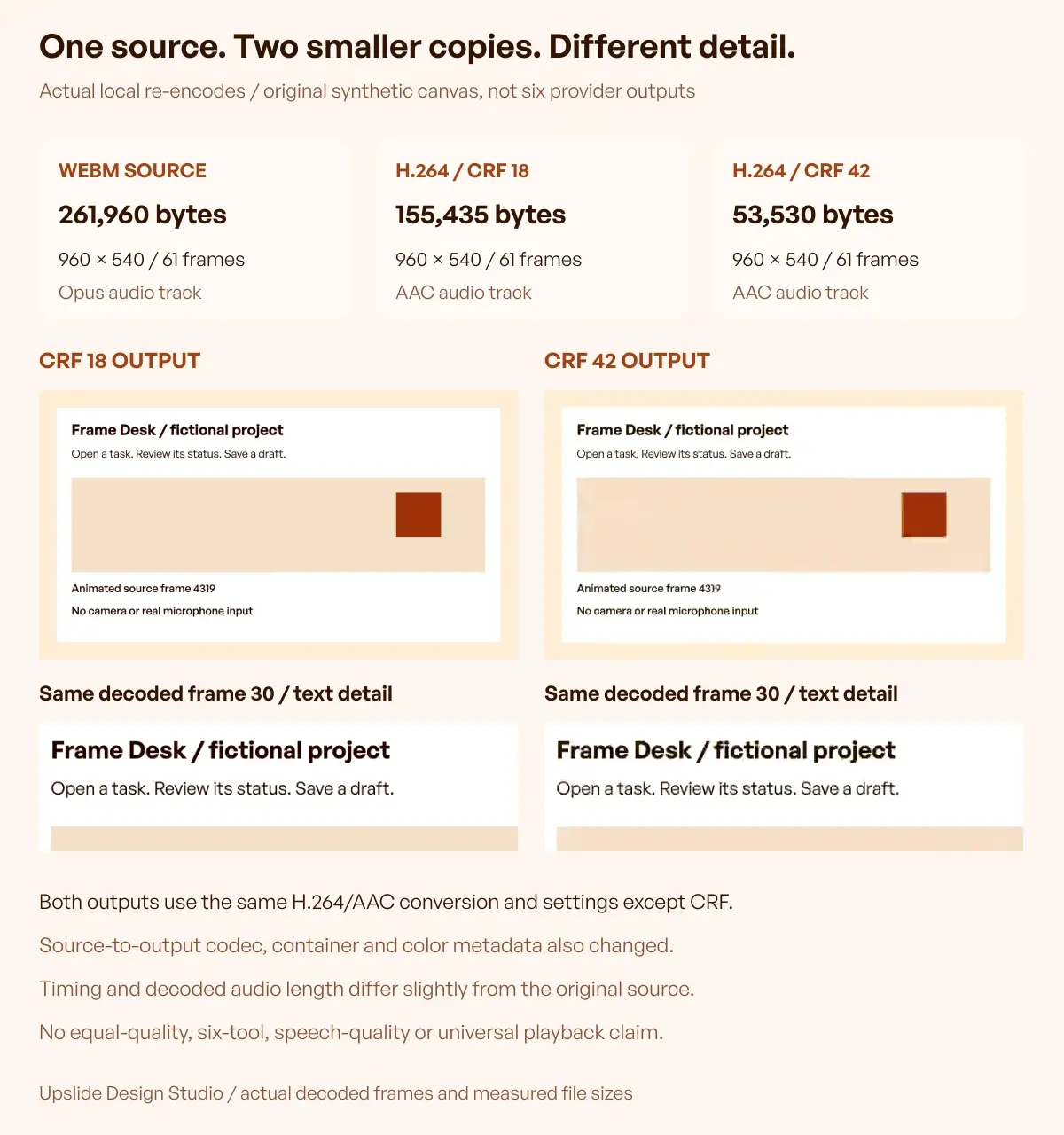
Original files and analysis by Upslide Design Studio. One local executable and one synthetic source; not a six-provider benchmark.
| Actual artifact | Bytes | Picture | Audio |
|---|---|---|---|
| Original WebM source | 261,960 | 960 × 540, VP8 | Opus, synthesized input |
| H.264 example at CRF 18 | 155,435 | 960 × 540 | AAC with the declared output settings |
| H.264 example at CRF 42 | 53,530 | 960 × 540 | AAC with the same declared output settings |
The smaller example visibly softens text and edges in the inspected decoded frame. The comparison therefore does not claim equal quality. Both outputs are smaller than this particular source, but changing the source codec, container and reported color metadata also prevents treating the result as a universal compression ratio.
Check more than the byte count
All three artifacts decoded to 61 video frames in our inspection, with the same picture dimensions and one audio track. The two output video spans matched each other; they differed slightly from the source's recorded timing.
The source's decoded video span was about 4.058 seconds, while the outputs were about 4.067 seconds. Decoded audio length also differed after conversion from Opus to AAC. These small differences remain recorded rather than being described as an exactly unchanged file.
Actual commands, executable details, hashes, decoded frames and audio sample counts were retained. Track presence and successful decoding do not establish speech clarity, accurate synchronization or compatibility with every player. This fixture's sound is not speech.
Repeat the comparison with representative material
Choose a permitted short source containing the kinds of detail your job needs. Keep its complete sequence when comparing the effect of an encoding change. If you deliberately trim or resize, record that as another version with its own purpose.
Inspect the result at the intended viewing size and throughout motion. A single extracted frame can reveal softened text, but it cannot establish that every transition and sound remains appropriate.
Keep the smallest result that meets the actual acceptance criteria, rather than the smallest file the tool can produce. If a fixed upload cap makes the explanation unusable, revisit the delivery or content decision instead of quietly accepting damaged material.
Retain a useful delivery record
| Record | Evidence to keep |
|---|---|
| Source | Approved master, duration and required content |
| Operation | Tool/build, selected settings and deliberate changes |
| Output | Actual bytes, dimensions, sequence and retained tracks |
| Review | Picture and sound observations in the receiving environment |
| Limitation | Failed requirement, uncertainty or follow-up decision |
Use specific findings. “The status label softens at the smaller setting” is more useful than “low quality.” “File exceeds the confirmed limit” identifies a different failure from “file fits but the intended player rejects it.”
Continue in Resource Box and Inspire
Use Resource Box to revisit the six compression routes and their current original documentation. Match local control, a browser workflow and the required output to the actual job.
Use Daily Inspire to study how a page gives motion a clear communication role. Credit the original reference. Its preview does not disclose its encoder settings or prove that a particular compression decision improved performance.
The published SaaS website examples guide can help define what the page needs to explain. This comparison uses verified resources and an original file exercise, so it does not depend on a new daily gallery edition.
Frequently asked questions
Can a smaller video keep exactly the same quality?
Do not infer that from size alone. Different operations preserve or discard different information. Review the actual result; our smaller teaching example visibly changes text and edges.
Does lowering the resolution count as compression?
It can be part of a size-reduction workflow, but it changes the number of picture pixels. Record it separately when comparing settings. A smaller frame is not the same controlled case as an unchanged frame encoded differently.
Does a target-size field guarantee the final byte count?
Check the delivered file. Shutter Encoder's documentation explicitly describes its size target as an attempt. An estimate or requested number should not replace measurement against the real receiving limit.
Are conversion minutes the video's duration?
FreeConvert describes its conversion minutes as server processing time. The input's running time is a different quantity. Check the account's actual usage and conditions before estimating capacity.
Is every MP4 accepted by every player?
No universal guarantee follows from the extension. Check the actual streams, settings and receiving environment. Successful decoding in one local operation does not certify every destination.
Were the six resources tested with the example?
No. Current official routes and three comparable guides informed the selection. The measured exercise used one installed FFmpeg executable and an original synthetic source.
Did the example preserve identical audio and timing?
It retained an audio track, but converted its codec and changed decoded sample length. Video timing also differed slightly from the source. Those differences are documented rather than represented as exact preservation.
When should an accepted output be checked again?
Recheck when the source, settings, tool build, account route or destination changes. Retain the master and prior acceptance record. An earlier successful output does not automatically validate a new operation.
Key takeaways
- Define the real size and receiving requirements before selecting a route.
- Keep compression, resizing, trimming and track removal distinguishable.
- Measure actual bytes and inspect retained picture, timing and sound.
- Qualify provider estimates, account gates and the selected output.
- Preserve the source and the record of what changed.
Use the local exercise as an acceptance brief. Our free UI/UX course supports practical design learning while keeping the same neutral criteria for every resource.