
When you ask for three paragraphs of placeholder text, what exactly should arrive in the file: three separate paragraphs, a particular word count, or one long block that merely looks about right?
A lorem ipsum generator can supply a temporary text specimen while the real copy is unavailable. The useful choice depends on the amount control, the paragraph structure and the format that the receiving document expects. A familiar Latin-looking opening doesn't settle any of those requirements.
This guide compares Lipsum, Blind Text Generator and LoremIpsum.io through their public pages and documented controls. An original local exercise checks the same constructed text as plain text and HTML, then deliberately damages its count or grouping. The exercise is separate from the three services; no provider's generation accuracy, clipboard behavior or privacy was tested.
Define the specimen before generating it, and keep the resulting text stable while comparing designs.
Design task
Name the temporary job
Placeholder text is useful when a team needs an initial body-text block before editorial content exists. It can supply material for comparing a reading column, setting up a repeatable component example or preparing an empty document structure. The temporary job should remain visible in the design record.
Different questions require different material. A heading's wording, a navigation label and an error message carry meaning that filler cannot supply. A prototype asking someone to complete a task needs understandable instructions and outcomes, even when a secondary article excerpt is still provisional.
Decide which blocks may contain generated filler and which require representative copy. That avoids a false choice between filling every text field with pseudo-Latin and waiting until every paragraph has final approval. Useful draft content can precede polished writing.
For a SaaS product page, the product explanation and next action can be drafted while a lower-priority editorial sample remains temporary. For a reading component, the specimen can be the main working material. The generator serves the declared task rather than determining what the page needs to say.
Specify the unit and the receiving field
Write a short request before opening a generator. Include the unit, the amount, the expected grouping and the destination. “Approximately enough text for this box” can be adequate for an early sketch, but it cannot support a later claim that two layouts used identical content.
A practical request might say:
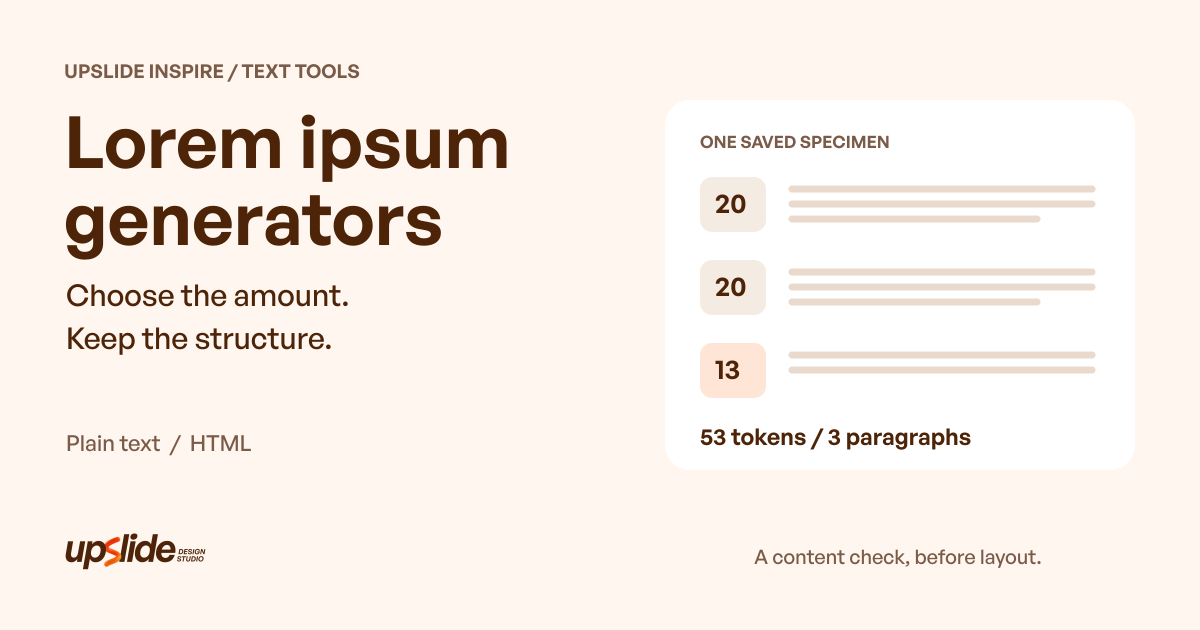
- Supply 53 whitespace-separated tokens for one saved teaching specimen.
- Divide them into three paragraphs containing 20, 20 and 13 tokens.
- Keep the word order unchanged between versions.
- Prepare plain text for a text layer and a separate HTML version for a markup field.
- Save both artifacts and record which version each design uses.
Those are declared specimen requirements, not recommended lengths for a website. A real project should choose quantities around its own content. If the final material is unknown, include that uncertainty instead of quietly treating a convenient generated amount as an editorial specification.
Keep the sample stable during comparison
Generating again can change the material under review. If the font, column and paragraph text all change together, a difference in the result cannot be attributed to one design decision with confidence.
Save the specimen used in the first comparison and reuse it when the intended comparison requires controlled content. A new sample can be valuable for a second case, but label it separately. “Same settings” and “same resulting text” are different records.
Keep at least a short ordinary sample and an intentionally longer case when reviewing a real component. Filler can help create the initial material, but the meaningful names, labels and translations still need separate representative examples. A successful pseudo-Latin block does not establish that the component handles the actual product vocabulary.
Resource kit
Compare three routes by the control that matters
These are three relevant routes rather than a ranked collection. The public source pages establish the offered controls or documented choices; the original exercise below does not establish how any of these services performs.
| Source | Publicly observed or documented choices | Useful next check |
|---|---|---|
| Lipsum | Paragraphs, words, bytes and lists; opening-text toggle | Confirm that the selected unit matches the request |
| Blind Text Generator | Text variants, words or characters, paragraphs and optional paragraph tags | Inspect grouping and whether markup belongs in the destination |
| LoremIpsum.io | Generator entry documents characters, words, sentences and paragraphs | Confirm the interactive route loads and inspect the resulting artifact |
Current pricing and output permissions for these three routes remain unverified. Public access to a form should not be turned into a blanket permission to reuse every piece of text, translation, image or page material associated with that website.
Lipsum: choose the amount mode deliberately
Lipsum presents paragraph, word, byte and list options, with a choice about the familiar opening. It is a relevant starting point when the required unit is already clear.
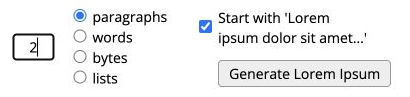
Credit: Lipsum. Actual public form crop. The amount field was set to 2 without submitting generation; no output was generated for this comparison.
A byte request and a word request are different instructions. Choose the appropriate mode, then retain the actual output when exact material matters. This guide does not claim that selecting a mode was tested or that the site's output matches an independently specified counting rule.
The page also contains explanatory and historical material. That surrounding content is distinct from the requested specimen. Avoid copying a whole page into a design field when the intended artifact is only the generated block.
Blind Text Generator: separate text content from its presentation
Blind Text Generator exposes multiple text variants, words and characters, paragraph controls, and an option to display paragraph tags. Its advanced area includes typography settings.
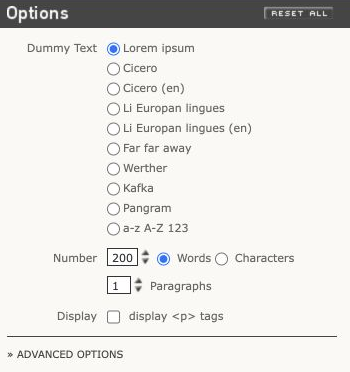
Credit: Blind Text Generator and its credited contributors. Actual public options preview; no exported sample, font comparison or clipboard operation is claimed.
This combination is worth investigating when grouping and markup are part of the request. It also calls for a distinction: a site's font or line-height controls describe its preview, while the receiving design may apply another style entirely.
Choose the text variant intentionally and inspect its content before sharing a mockup. A named passage or language option is not evidence of translation accuracy or suitability for a product task. Keep those judgments separate from whether a paragraph-shaped sample can be produced.
LoremIpsum.io: distinguish a documented choice from a completed operation
The LoremIpsum.io generator entry documents character, word, sentence and paragraph choices. During text-source inspection, the generator area exposed a loading message rather than a completed output.
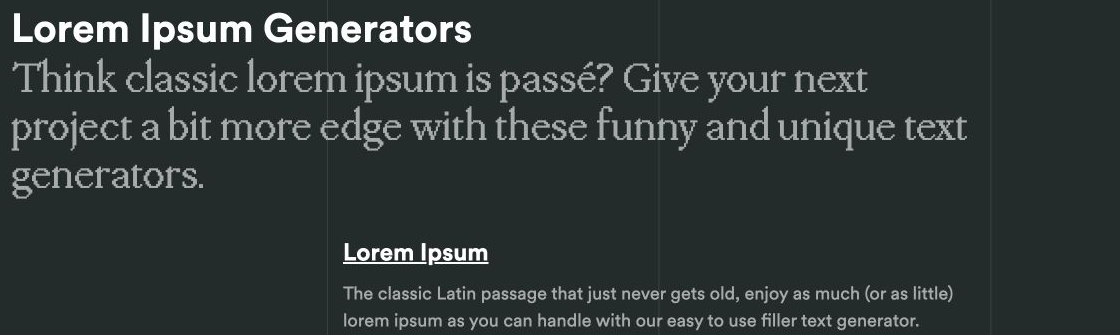
Credit: LoremIpsum.io / Wasai. Actual public provider guide preview, not the generator interface. The generator remained on a loading message during inspection; no provider output or count was verified.
The pictured provider guide is separate from the interactive generator. The route remains relevant for someone investigating those amount modes, but the next step is concrete: load the working control, request the needed unit and inspect the result. If the interface does not become available in the intended environment, choose another route instead of treating the surrounding explanation as a completed generation.
Retain that distinction in team notes. “The entry describes sentence mode” is supported by the page. “The generated text contained exactly the requested sentences” would require an actual operation and an explicit counting rule.
How the pieces work together
Match plain text and HTML to the receiving editor
Plain text and HTML can carry the same words while remaining different artifacts. The HTML paragraph element represents a paragraph; its markup is meaningful when interpreted as HTML, rather than a decorative substitute for a blank line.
An ordinary text layer may display pasted tags as literal characters. A rich-text editor may accept formatting through one input route and escape it through another. Inspect the destination's actual behavior rather than assuming that every field called “content” interprets markup in the same way.
Choose plain text for a plain-text requirement. Choose HTML when the destination expects that structure, then inspect the saved or rendered result there. The local parser exercise below checks simple paragraph content; it does not replace that destination check.
Treat word, character and byte counts as separate measurements
A visible amount control does not define every detail of counting. Punctuation, spacing and script can affect how software divides text into words. Decide what the number means for the immediate task and use the same rule when checking the artifact.
The original exercise uses a deliberately narrow rule: a token is a nonempty run separated by ASCII whitespace. Attached punctuation stays with its token. That rule is straightforward for the constructed specimen, but it is not a universal segmentation method for natural languages.
Character and byte requests need their own definitions and checks. Neither establishes a number of rendered lines. Font, size, width and the actual receiving environment remain separate inputs to layout.
Limitations and alternatives
Do not infer language or usability coverage
Pseudo-Latin cannot demonstrate that a product's real error message is understandable or that a translated label fits. A language selector on a website also needs interpretation: it may change the surrounding interface, the specimen or both.
Use approved representative content for the relevant language and task. That includes the actual names, punctuation and script needed by the interface. A filler generator is not a translation review, a font-coverage audit or a substitute for reading the important message.
The same boundary applies to user research. A participant cannot evaluate the meaning of a subscription condition or recovery instruction that has been replaced with nonsense. Use meaningful draft content for the decision under study and label any remaining filler clearly.
Review access, rights and privacy separately
The public pages support a comparison of available routes. They do not establish an exhaustive licence analysis, an account entitlement or an ongoing free-plan promise. Verify the chosen source's current conditions for the intended use, especially when a variant incorporates another author's prose or entertainment material.
Privacy is another question. Lipsum's published policy describes data collection and analytics, while LoremIpsum.io's policy describes collection through service use and website technologies. Neither policy was tested against network behavior for this guide.
A filler task does not require confidential customer copy as input. Avoid supplying sensitive material merely to obtain a temporary block of text. Check the relevant service policy and the team's handling requirements when an actual workflow involves private content.
Worked example
An original check of 53 tokens in two formats
The constructed exercise starts with an author-selected pool of 20 pseudo-Latin-like tokens. It repeats that ordered pool and takes the first 53 tokens, divided into groups of 20, 20 and 13. This is transparent teaching material, not authentic Latin and not a sample obtained from one of the three providers.
The script saves the groups in two ways. The plain-text file separates paragraphs with blank lines. The HTML file wraps the same three strings in paragraph elements, escaping text content before serialization.
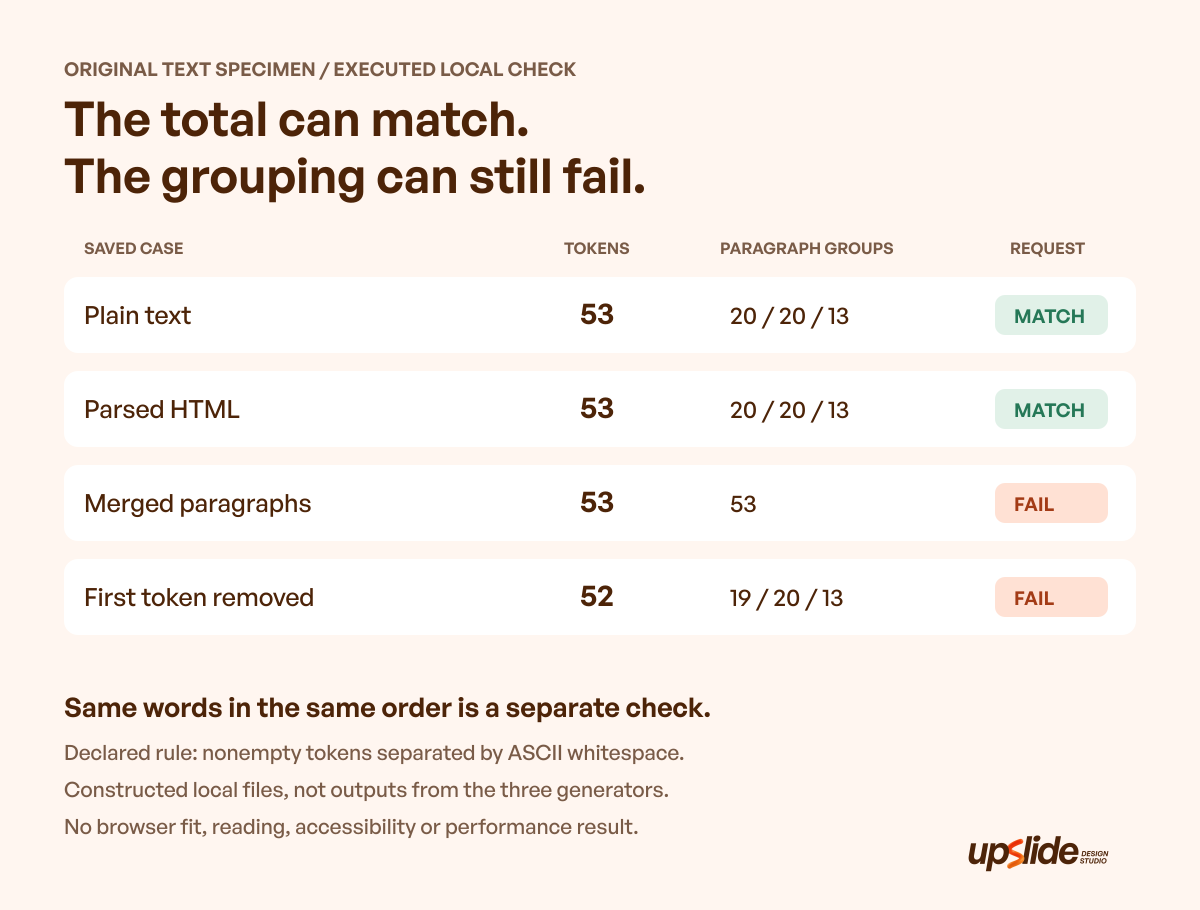
Original constructed specimen, script and explanatory graphic: Upslide Design Studio. Executed local content and serialization checks; no third-party generation, browser layout, participant or accessibility test.
The check reads the saved files and compares the recovered paragraph strings with the expected sequence. Both valid versions contain 53 tokens in the required 20/20/13 grouping. Their bytes differ because the HTML includes markup; equality of the logical content does not mean byte identity.
| Saved case | Token total | Paragraph groups | Result against this request |
|---|---|---|---|
| Plain text | 53 | 20 / 20 / 13 | Matches |
| HTML after parsing the simple paragraph elements | 53 | 20 / 20 / 13 | Matches |
| Deliberately merged plain text | 53 | 53 | Fails grouping |
| Deliberately removed first token | 52 | 19 / 20 / 13 | Fails amount and exact content |
The merged negative case is the useful warning. A total-count check passes while the required grouping has disappeared. A separate negative case removes the first token, so the total and first paragraph both fail.
An additional, separately labelled sentinel verifies that the script recovers an ampersand and angle brackets from escaped HTML text. It is outside the 53-token specimen. It checks that small serialization example, not the security of an arbitrary HTML document.
Use the result to improve the request
A team needing paragraphs should check grouping, not only the grand total. A team comparing two typography treatments should retain the exact strings and order, not regenerate another sample with the same amount settings.
Those distinctions help explain a mismatch. If the words are unchanged but the destination joins paragraphs, investigate the paste or import route. If a word disappeared from the saved source, correct the content before drawing conclusions about the design.
The checks deliberately stop at the artifact. They do not establish fit inside a particular box, reading comfort, responsive behavior or browser conformance. Those need inspection in the actual destination with its own styles and content.
Choose a route and retire the filler
Start with the smallest set of controls needed for the request. Lipsum exposes several amount units; Blind Text Generator offers grouping and markup choices; LoremIpsum.io documents familiar amount modes whose interactive output still needs checking. There is no universal winner without a specific destination and artifact requirement.
Keep a short specimen record containing the source, selected mode, saved text, temporary status and replacement owner. When the content changes, preserve the earlier sample if the comparison needs to remain reproducible. Then evaluate representative real copy before treating the page or component as ready.
Useful design references can be found through Daily Inspire, while the three source routes are available through Resource Box. Inspect complete references and credit their creators; an attractive page does not reveal how its text was generated.
For a separate review of reading hierarchy, the published font-pairing guide compares shared content across typography treatments. The published graphic design software guide addresses the receiving editing workflow. Neither replaces a content check of the actual specimen.
Frequently asked questions
Which lorem ipsum generator should I choose?
Choose by the required unit, grouping and output format. Compare the actual saved result with that request. This guide identifies three relevant routes and does not rank provider output quality.
Are three paragraphs the same as a fixed word count?
Paragraph count alone does not specify the amount of text inside each group. Set a separate total or per-paragraph requirement when the comparison needs it. The constructed 53-token example uses an explicit 20/20/13 grouping.
Should HTML tags be pasted into a design text layer?
Use the format the receiving field expects. A plain-text layer may display the tags, while an HTML route can interpret them as structure. Inspect the actual pasted or imported result rather than relying on the generator's preview.
Can a generator's character setting predict line breaks?
Line breaks also depend on the actual text, font, styling and available width. An amount setting can prepare material, but it does not certify a rendered layout. Check the destination separately.
Can the same settings reproduce exactly the same specimen?
Do not assume that they do. Retain the actual output when exact content matters, and compare its recovered strings or stored file when necessary. A new generation should be labelled as a new sample.
Is lorem ipsum suitable for usability testing?
Use understandable content for the task, decision and feedback being evaluated. Temporary filler can remain in unrelated material when that limitation is explicit. It cannot establish that a meaningful instruction or product claim works.
Is every publicly accessible generator free for unrestricted reuse?
Access, pricing and output permissions are separate questions. Current pricing and output rights for these three routes remain unverified in this guide. Check the selected source and variant before relying on a reuse permission.
Did the worked exercise test the three generators?
It used an original local word pool and serializer. It checked saved content, paragraph structure and two deliberately damaged artifacts. It did not measure provider accuracy, browser behavior, reading outcomes or performance.
Key takeaways
- Specify the unit, amount, grouping and destination before choosing a generator.
- Save the actual specimen when a design comparison needs unchanged content.
- Inspect paragraph structure as well as the total; the merged case kept 53 tokens and still failed.
- Keep plain text, HTML and the receiving editor's behavior separate.
- Replace temporary filler with representative copy before approving meaningful communication.
If your team needs a clearer product page or interface, we can help through Upslide's design services. A useful starting point is the real message and the content the design must support.