Have you found an email template that looks right, only to discover that its message does not fit what the reader needs to do? A polished layout can hide missing instructions just as easily as a plain paragraph can.
An email template provides a repeatable starting point for a message. That starting point might be a reusable writing pattern, a designed HTML layout or a combination of both. Choose it around the communication first, then check what happens when the content enters the sending workflow.
This guide covers those decisions, compares three documented tool routes and follows an original saved-file exercise. The exercise separates agreement between plain-text and HTML content from the technical relationship between those versions. No emails were sent and no provider exports or inbox clients were tested.
A useful template preserves the message through editing, handoff and delivery.
Design task
Start with what the reader needs to know
Before browsing layouts, complete a short brief: who receives this message, what happened, what matters now and what the reader should do next. Add the facts that must survive every revision.
A workshop invitation needs a recognisable event, a date, a time with its time zone and a clear route to the details. A project update needs the current state, the relevant change and the next decision. Neither becomes useful simply by acquiring a large image and a button.
Write the essential message in ordinary text first. If the explanation is unclear there, a template selection screen is unlikely to resolve it. This also creates a reference for reviewing later versions.
Separate confirmed information from placeholders. Brackets can make an unfinished field visible during drafting, but an editor still needs a deliberate check before release. A plausible example date is easier to miss than an obvious placeholder.
Choose a message pattern before choosing its styling
These writing patterns are editorial starting points. They are not scripts that fit every recipient or situation.
| Message | Useful subject pattern | Body structure | Action to clarify |
|---|---|---|---|
| Invitation | Event name and relevant date | Why it matters, practical details, destination | Review details or register, according to the actual workflow |
| Project update | Project name and current milestone | What changed, current state, unresolved decision | Review a specific item or answer a defined question |
| Follow-up | Recognisable topic and next step | Brief context, outstanding item, relevant timing | Supply the missing input or confirm the next step |
| Welcome | Service or community name and orientation | What the reader has joined, what happens next, where to get help | Take the first useful step |
| Announcement | The change in direct language | What changed, who is affected, when it applies | Read details or take the required action |
For example, a fictional invitation could use the subject “Layout workshop: review the details.” Its body states “Layout workshop,” “18 November 2026” and “14:00 UTC,” then provides a link labelled “Review workshop details.”
That example does not promise that registration has opened or that a seat has been reserved. The action describes the destination. If registration later becomes the required task, change the label and destination together rather than leaving a misleading inherited button.
For a follow-up, replace a vague “Just checking in” with enough context to identify the unresolved item. Keep the requested response specific. A recipient should not have to reconstruct the whole exchange to understand the question.
Decide whether the message needs a designed layout
A short professional reply may work as editable text inside the existing conversation. A recurring newsletter may need a reusable layout with clear sections. An operational message may depend on a sending system that inserts changing account or event information.
These routes place responsibility in different places. A writing snippet governs language. An HTML template also carries structural and visual decisions.
A sending configuration adds recipients, variables and delivery behaviour around the content.
Select the smallest route that supports the actual message. If a team needs an editable newsletter layout, confirm who edits it and where the finished content goes. If it needs reusable correspondence, a large campaign platform may introduce work without solving the core writing problem.
Resource kit
Mailchimp: consider the template inside its sending workflow
Mailchimp is relevant when a team wants to work with templates inside its broader email-marketing platform. Its public HTML email guidance discusses plain-text and HTML versions and recommends testing the actual email presentation.
Use that distinction when reviewing a template: which parts are editable, what supplies the plain-text representation, and what changes when the message becomes a campaign? Confirm those answers in the intended account and workflow before choosing a plan.

The preview provides useful visual variety, but it does not establish which template suits your message or which features your account includes. Replace the sample offer with your actual content before judging the layout.
Check image sources, destinations, reusable sections and the receiving process. A familiar visual style does not demonstrate that the final message has been assembled correctly.
Stripo: consider the builder and its handoff
Stripo provides an email-design route with a public template catalogue and reusable editing features. Its platform guide distinguishes the email builder from the wider sending process.
That distinction matters when one person designs and another publishes. Identify the editable source, the selected export or integration route and the owner of the final message. Confirm the particular sending platform and account arrangement instead of assuming that a general integration claim covers every setup.

Use a catalogue to explore structures, then test the chosen structure with a realistic title, a longer paragraph and the actual action. A layout selected using short demonstration copy may behave differently once the working message arrives.
Stripo’s company history explicitly dates its launch to February 2017 and reports more than 1.7 million users worldwide. That is a company-reported platform figure with no stated activity period, rather than a monthly-active-user or website-visitor measure. Resource Box records that scope alongside the source.
RGE Studio: use the current builder identity
RGE Studio is the current identity for the builder previously known as Beefree. The 14 May 2026 announcement explains that move. Older tutorials may still use the earlier name.
The builder and the Really Good Emails inspiration gallery serve related but different purposes. Studying an example email is different from maintaining an editable template or exporting a message into a sending stack.

The rebrand announcement reported more than 40,000 people using the former Beefree app each month. Resource Box labels that as a historical May 2026 builder figure. It does not convert the figure into current Studio usage, gallery membership, SDK usage or website traffic.
Check the current destination when following an older tutorial. The selected builder, the editable file and the publishing destination should remain identifiable throughout the handoff.
How the pieces work together
Keep content responsibilities explicit
Define the parts that authors may change: subject, opening, section headings, factual fields, action labels and destinations. Define separately which shared elements need review when changed, such as an identity block or help route.
Assign an owner to the message facts. A designer can improve hierarchy, but an attractive date remains wrong if nobody confirms it. Likewise, a correct date in one version does not resolve a conflicting date elsewhere.
Keep a recognisable source version rather than circulating several files labelled “final.” Record which template revision produced the message, who supplied its current facts and which destination was checked. The purpose is to make a later correction traceable.
Review layout with the real content
Replace demonstration copy before making a selection. Try the actual heading, a realistic longest paragraph, a meaningful link label and the expected image. Inspect whether the message remains understandable when an image is absent.
Check reading order, heading hierarchy, contrast, useful alternative text and the clarity of links. The published colour-contrast guide explains how to review actual states rather than isolated swatches.
Review the actual small-screen presentation and the intended email clients. An editor’s narrow preview can help during composition, but it does not establish how a receiving application will interpret the final message.
If a team is also choosing a website platform, the published free website-builder guide covers that separate decision. Email templates add a receiving and delivery context of their own.
Check what a reused design carries forward
A saved newsletter layout and a configured campaign are different records. Brevo's template documentation says that using a template for a campaign retains its design, while sender, subject, preview text and other parameters need campaign-level configuration. Keep those settings in the review checklist instead of assuming the visual template carries them all.
MailerLite's template guide distinguishes saved personal designs from its pre-designed gallery, which the reviewed documentation identifies as a paid feature. It also warns that changing an automation email's template loses its content and settings. Check the current account and preserve the working content before changing the selected layout; these documented conditions were not tested in a provider account.
For a recurring newsletter, identify which sections are required, repeated or optional. Define what happens when an edition has fewer stories or no event. Removing an unused section is a different decision from leaving its heading and an empty space in the message.
Treat plain text and HTML as versions of the message
A designed email can have a plain-text representation as well as HTML. Check the essential facts and destinations in both. Removing visual formatting should not silently remove information needed to act.
The technical relationship also matters. RFC 2046, sections 5.1.3–5.1.4, distinguishes independent parts in a multipart message from alternative representations of the same information.
The alternatives format orders representations by preference, with the richer option ordinarily later. Receiving software and user choices still determine the presentation.
For a team reviewing interchangeable plain-text and HTML versions, content agreement and the appropriate container are separate questions. The following exercise makes that separation visible without claiming to simulate an inbox.
Worked example
Declare the message before assembling the files
We created three actual local `.eml` files for a fictional workshop. Their declared message contains four checks: the event name, date, time and details URL. All addresses and links use reserved `.example` domains.
The reference facts are “Layout workshop,” “18 November 2026,” “14:00 UTC” and `https://workshop.example/details`. They are invented teaching inputs, not an invitation or an operational event.
Each saved file contains a plain-text part followed by an HTML part. A local parser reopened the saved bytes and inspected the container, part types and presence of those four declared facts. Nothing was submitted to an email service.
Change one requirement at a time
The baseline uses `multipart/alternative`, with both versions retaining the four facts. The second file keeps those facts but changes the top-level relationship to `multipart/mixed`. That relationship is valid for independent parts; it does not meet this exercise’s requirement to offer interchangeable representations.
The third file keeps the alternatives relationship but changes the HTML date to 19 November. The plain-text version still says 18 November. A container-only check would miss that discrepancy.
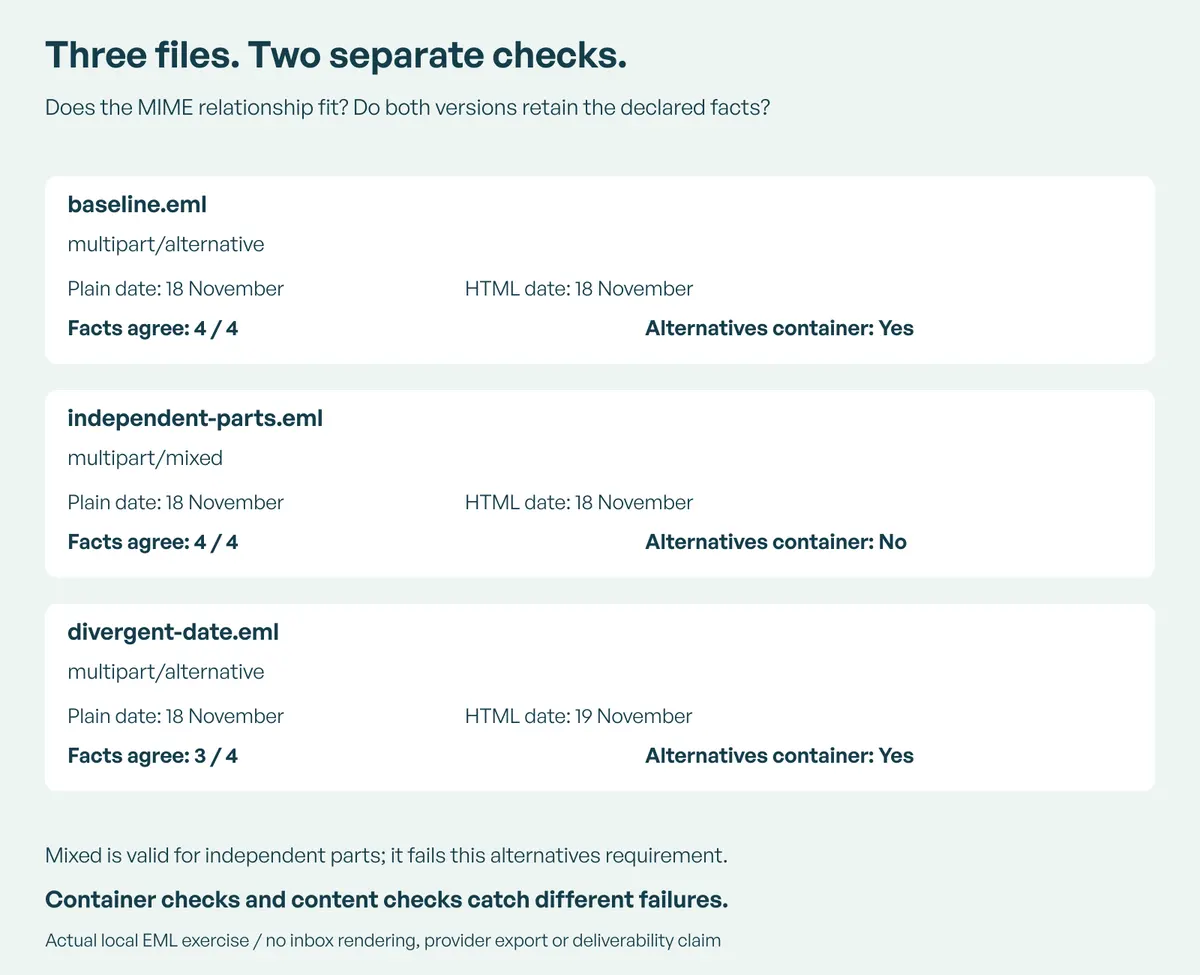
| Saved file | Container | Facts present in both versions | Meets the declared alternatives relationship? |
|---|---|---|---|
| Baseline | multipart/alternative | 4 of 4 | Yes |
| Independent parts | multipart/mixed | 4 of 4 | No |
| Divergent date | multipart/alternative | 3 of 4 | Yes |
These results support a limited conclusion: the two checks detect different constructed failures. They do not show that one vendor produces better email, that a recipient will see a particular version or that a message will reach an inbox.
Apply the distinction during a real review
Begin with the approved message facts. Compare them with the plain-text content and the HTML content produced by the actual sending workflow. Check destinations as well as visible labels.
Then inspect the delivered structure through the tools available in that workflow and test the message in the intended clients. Preserve the particular version being reviewed. If a later edit changes the date, destination or offer, repeat the affected checks rather than relying on an earlier approval.
The file exercise checks known literal facts. Real messages may express the same information in different wording, so automated matching alone cannot replace editorial judgment. Ambiguous language can survive a technically successful parse.
Check newsletter sections across two editions
A second original exercise uses two fictional editions of “Northline Notes.” Edition A contains a lead story and two updates, with no event; edition B contains a lead story, one update and an event. These are authored inputs with reserved example-domain links, not subscriber messages or published editions.
The local script saved and reopened the edition data, then wrote three small HTML constructions. A parser reopened each saved file and checked the ordered story identifiers, whether an event section appeared and, where required, its destination. These checks concern the declared section structure, not an inbox's rendering.
| Saved construction | Story sections | Event sections | Result against the declared edition |
|---|---|---|---|
| Edition A | 3 | 0 | Story order matches; absent event omitted |
| Edition B | 2 | 1 | Story order matches; event destination retained |
| Edition A with an empty event block | 3 | 1 | Empty optional event section detected |
The deliberately faulty construction still has the expected stories in the expected order. It fails the separate rule that an edition without event content must omit that section. A story-count check alone would therefore miss this particular problem.
Use the distinction when shortlisting a newsletter template. Populate one representative edition, then try a shorter edition without the optional material. Decide whether the structure supports both without placeholder headings or unrelated filler.
No email was sent, and the local HTML is not a production email template or a claim about either provider's conditional-content features. The check does not assess visual spacing, link reachability, deliverability or reader understanding. Those questions remain with the actual editing and receiving workflow.
Limitations and alternatives
The tools above were assessed through current public documentation and attributed provider previews. We did not create accounts, send campaigns, export from their editors, compare inbox placement or measure production speed. Features, account permissions and commercial terms need checking for the selected setup.
A writing-only template may be enough for a brief personal exchange. An existing sending platform’s own editor may avoid an additional handoff. A dedicated builder may suit a team that needs reusable layouts across a particular publishing stack.
The choice depends on that stack and its editors.
Use Daily Inspire to study how creators establish hierarchy and rhythm, crediting the source. Translate the underlying observation into your own message instead of copying a photographed email or treating a gallery image as an editable template.
Frequently asked questions
What is an email template?
It is a repeatable starting point for an email. It can define wording, a visual layout or both.
Its usefulness depends on whether the actual message fits the structure and whether the team can maintain it in the intended workflow.
How do I choose between a writing template and an HTML template?
Start with the communication and receiving context. Reusable text may suit direct correspondence; a recurring designed publication may need HTML structure.
Confirm editing and sending responsibilities before adding a separate builder.
Can I reuse the same template for every email?
Shared identity elements can remain consistent, but an invitation, project update and welcome message need different information. Change the message structure when the reader’s task changes. Do not retain irrelevant sections merely because they were in the original design.
Does a mobile editor preview prove the email works on phones?
It helps inspect the proposed layout at a smaller width. It does not prove how the final email behaves in each receiving application. Review the actual content and test the intended clients through the real sending workflow.
Why should the plain-text and HTML versions agree?
They should communicate the same essential facts when offered as representations of one message. A changed date or destination can give recipients conflicting instructions.
Check both after substantive edits rather than assuming one stays synchronised automatically.
Is multipart/mixed always an email error?
No.
It describes a valid relationship for independent parts. It fails the particular requirement in this exercise because we wanted interchangeable plain-text and HTML representations. The correct structure depends on the message being assembled.
Is RGE Studio the same thing as the Really Good Emails gallery?
They have distinct roles under the same broader identity. The Studio route provides the builder formerly known as Beefree; the gallery supplies examples for inspiration. Confirm which destination an older tutorial or shared link actually refers to.
Do the user counts show which template tool is best?
No. A reported platform total and a historical monthly-use figure have different scopes. Neither establishes template suitability, present activity, website visitors or results for your team.
Use the source and date as context, then evaluate the workflow itself.
Does reusing a newsletter design preserve every campaign setting?
Do not assume that design reuse transfers sender information, subject, preview text or every delivery option. Brevo documents a campaign-level setup distinction; MailerLite documents different behavior for changing campaign and automation templates. Verify the selected operation and retain the current content before replacing its layout.
Key takeaways
- Choose the message pattern first, test the layout with real content and keep the editable source identifiable.
- Review plain-text and HTML facts separately from their technical relationship.
- Verify the actual message through its intended sending and receiving workflow.
- Maintain those checks and ongoing ownership.
We maintain Resource Box to help you investigate current tools and their documented context. Use it to shortlist a workflow, then verify that workflow with your own message.