Can someone follow your storyboard without hearing you explain what happens between the pictures?
A storyboard arranges visual panels into a proposed sequence. It helps a team decide what a viewer will see, what changes and which instructions need to travel with each moment. A drawing can be rough while its purpose is precise.
This guide covers a complete working board: interpreting a script, selecting moments, annotating shots, reviewing order and handing over a revision. An original four-panel construction shows why keeping every picture is different from keeping the intended sequence. It includes actual saved board files, with no claimed film shoot or provider trial.
Design task
Start with the change the audience needs to follow
Write the sequence in plain language before opening an editor. Identify the starting situation, the event that changes it and the ending the viewer should understand.
For a demonstration, that might be an object moving from one condition to another. For a dialogue scene, it might be a character reacting to new information. For an explanation, it might be a concept becoming understandable through successive examples.
That sentence gives the board a working purpose. It also exposes missing decisions: if the explanation depends on an action that never appears, another attractive panel will not necessarily supply it.
Adobe's storyboarding introduction describes translating a script into visual drawings and considering how shots work together. Its examples include rough drawings as well as more finished illustration. The relevant lesson is to choose images that communicate the proposed scene.
Distinguish a panel, a shot and a scene
Use a small vocabulary consistently within the project. A panel is one drawn or assembled image on the board. A shot describes a proposed camera view; several panels may be needed to explain how its action develops.
A scene provides the larger dramatic or practical context.
For example, the camera might remain fixed while a hand places an empty cup, pours water and removes it. Those changes can require several panels even though the board proposes no camera cut.
Make the relationship explicit in the numbering. A panel label should let someone discuss a particular drawing without accidentally implying another shot or location.
| Working element | What to record | Question it should answer |
|---|---|---|
| Sequence purpose | A short statement of the intended change | What must the viewer follow? |
| Panel identifier | A stable reference and current order | Which moment are we discussing? |
| Image | Framing, subjects and important relationships | What is visible? |
| Action | The change within or between panels | What happens? |
| Audio | Dialogue, sound, silence or unresolved need | What accompanies the image? |
| Timing | A proposed duration or an open question | How is the moment intended to unfold? |
| Revision | What changed and who needs to review it | Which plan is current? |
This is a reusable working structure, not a universal production standard. Add the fields that the receiving team needs, and remove decorative fields that nobody can interpret.
Decide what the board needs to settle
A concept discussion may need only rough composition and sequence. A production conversation may also need camera direction, props, dialogue references and unresolved practical requirements.
State the review question at the top. “Can we follow the handoff?” invites a different discussion from “Can this proposed camera movement be achieved in this location?”
A useful storyboard makes the intended change inspectable and keeps unresolved decisions visible.
Resource kit
Boords: keep the plan and review together

Boords' current creation documentation describes importing a script or starting with a blank board. It also provides an optional agent-assisted route. Those entry points should be distinguished from the older button instructions still present in some tutorials.
For a team reviewing several versions, investigate how the chosen workflow retains frame notes and the current board. Ask a reviewer to identify the intended action and unresolved feedback before treating a shared link as a successful handoff.
The illustration here is actual provider material from the public guide. Its sample project and interface are not a board created or operated by Upslide. No account, approval or export was tested.
Check the current account's access and required output before committing. This guide makes no plan-price comparison or claim that every documented feature belongs to every subscription.
StudioBinder: connect panels with production detail
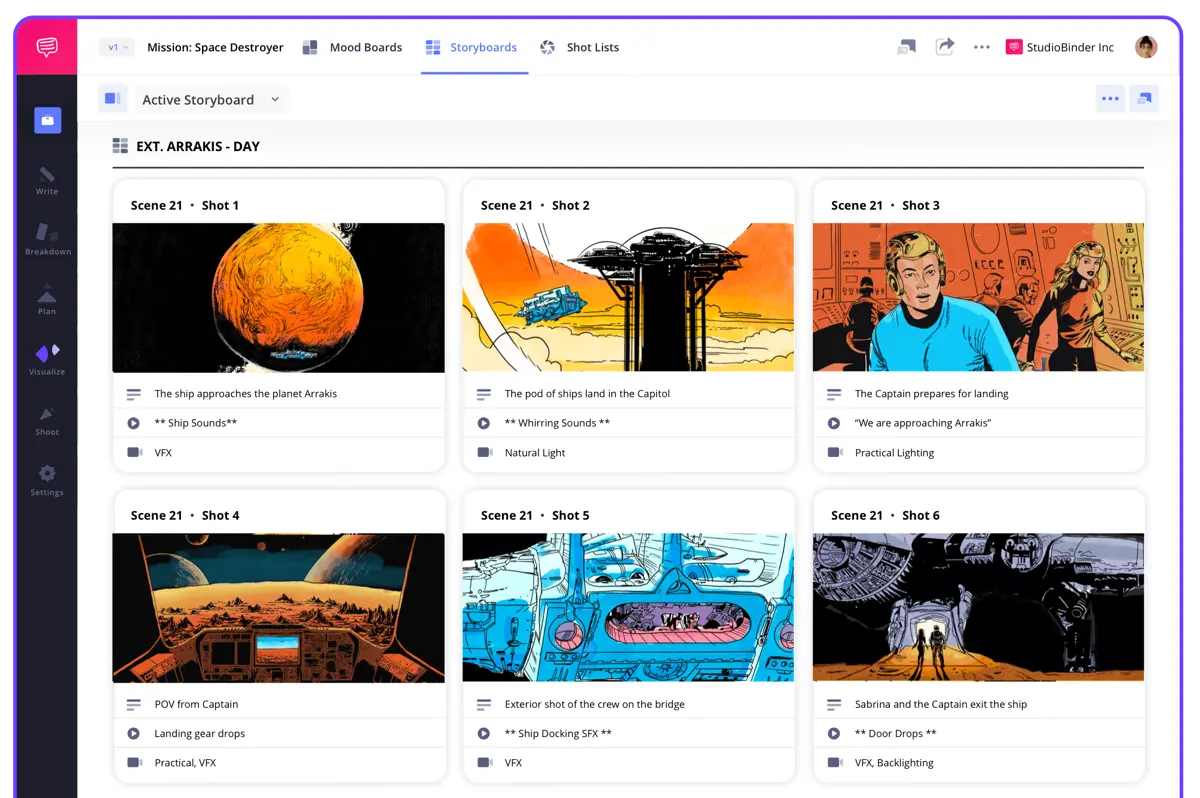
StudioBinder's storyboard creator documents shot details, image annotation, grouping, collaboration and customised PDF output within its production-planning platform.
That makes it a route to investigate when the board needs to travel with more explicit shot information. The useful evaluation is whether the receiving person can locate the relevant panel and its instructions in the chosen output.
The unchanged preview is StudioBinder's public example. It establishes the source of the illustration, rather than proving an Upslide editing session, successful export or an available account entitlement.
Keep the broader platform separate from this specific task. A production tool's other capabilities do not establish that a particular storyboard contains the decisions a crew needs.
Storyboarder: organise a drawing-led sequence

Wonder Unit's Storyboarder page describes a free open-source drawing and board organiser with action, dialogue and timing fields. Its landing page displays an old version number; consult the official release history when assessing an installation.
A drawing-led route can suit an author who wants to revise panels directly. Confirm the actual receiving machine, source-file arrangement and output before relying on it for a team deadline.
The preview is original provider imagery, not a current installed version operated for this article. No application installation, compatibility test, Photoshop connection or export was performed.
These three tools were added to Resource Box before writing. Original public launch dates remain unverified. Sourced audience notes distinguish cumulative registrations and an undated historical claim; they are not current active-user comparisons or evidence of storyboard quality.
How the pieces work together
Choose moments around meaningful changes
Read the script or sequence description once for its overall purpose. Then mark where a new image would explain something that the previous panel leaves unclear.
Useful candidates include an entrance, a revealed object, a changed viewpoint, a reaction or a transition to another place. The board does not need one panel for every sentence, nor can one panel automatically explain a long action.
Begin with a rough pass. Put the proposed images in order and inspect them together before adding finish. If the sequence depends on an unseen action, decide whether to show it, describe it clearly or deliberately leave a narrative gap.
Separate camera movement from subject movement
An arrow without context can be ambiguous. Does it mean the person walks right, the camera pans right or the image should be repositioned in the layout?
Use distinct notation and a short legend when necessary. Write the action alongside the image rather than rely on someone recognising your private drawing convention.
Keep proposed movement attached to the relevant panel or shot. A general note elsewhere can become detached when the sequence is rearranged or a single frame is sent for comment.
Write instructions that survive a handoff
“Looks good” records an opinion; “hold the empty cup in view before pouring” records a decision another person can discuss. Use notes to clarify what the drawing leaves uncertain.
Keep dialogue and audio distinguishable from visible action. Explicit silence can be an intended choice, while an empty field may simply mean the author has not decided. Record that distinction when it matters.
Timing also needs a status. A proposed three-second hold is an authored estimate until someone examines the sequence in time. Preserve the estimate without presenting it as the measured duration of a finished shot.
Review sequence before illustration finish
StudioBinder's full storyboarding guide treats descriptions, movement annotations, collaboration and delivery as parts of the process. Its sequence is a useful reference, but this guide does not adopt its broad efficiency promises.
Run a review with three separate questions:
1. Can the proposed events be followed in the intended order? 2. Do the images and notes agree about what happens? 3. Which decisions still require a practical or creative discussion?
Resolving one question does not resolve the others. A correctly ordered board can still contain unclear drawing, incomplete audio instructions or an impractical shot.
Worked example
Define a deliberately small sequence
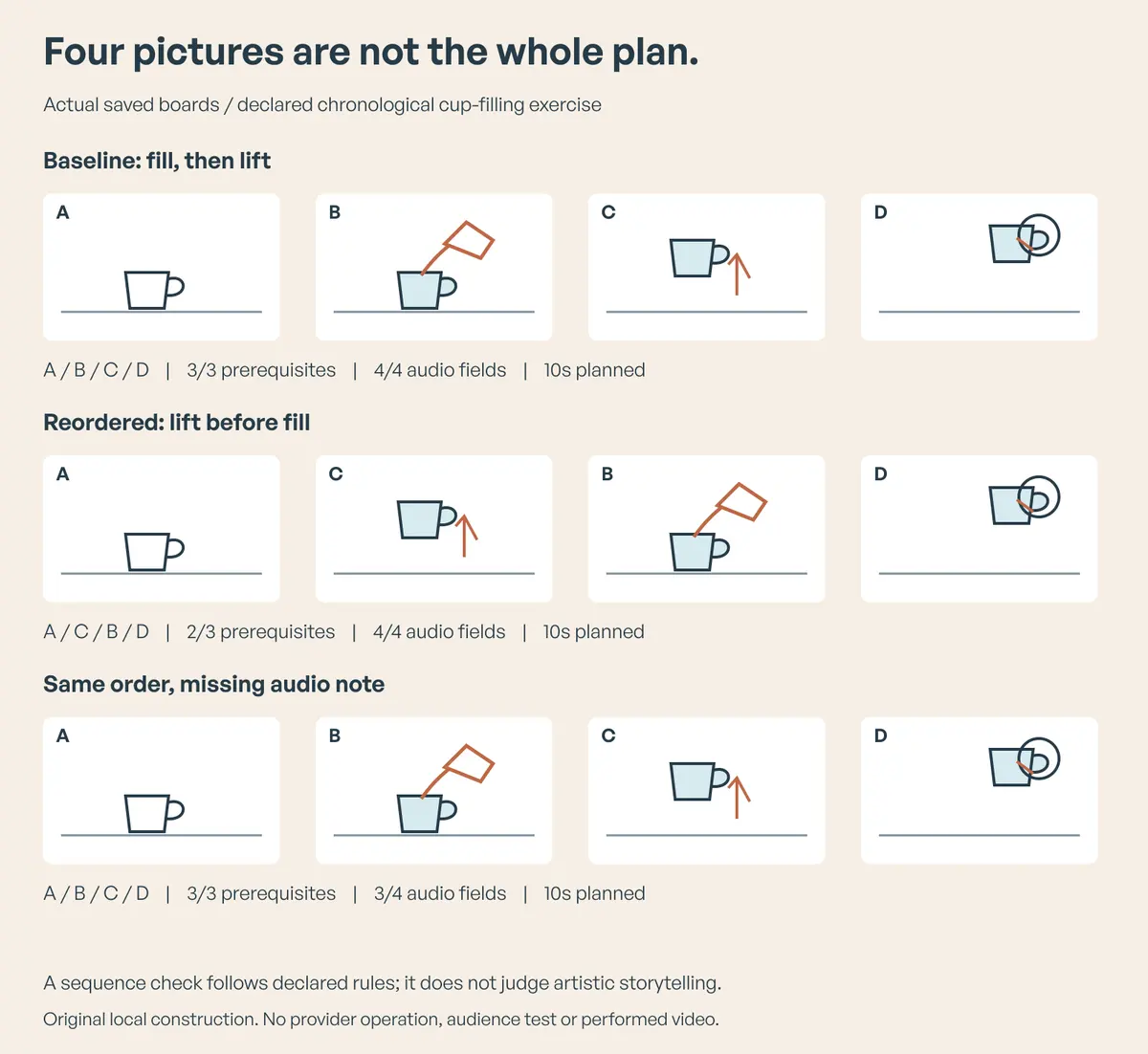
The original example is a fictional cup-filling sequence. Its declared premise is chronological: a person fills an empty cup before taking a sip. There is no flashback, offscreen refill or deliberate time jump.
Four original line drawings represent the plan. The source stores an identifier, action, audio note, proposed duration and any required earlier panel. The files were written to disk and reopened for checking.
| Panel | Declared action | Audio note | Planned duration |
|---|---|---|---|
| A | Place an empty cup on the table | Quiet room tone | 2 seconds |
| B | Pour water into the cup | Water pouring | 3 seconds |
| C | Lift the filled cup | Cup leaves the table | 2 seconds |
| D | Take a sip, then lower the cup | Room tone continues | 3 seconds |
These durations are teaching choices. No person performed the sequence, and no edited video or timed animatic was produced. The drawing for D represents the sip; its action note also proposes lowering the cup afterward.
Retain three versions with different problems
The baseline stores A, B, C and D in order. The second version retains the same four panels and notes but moves C before B. The third retains the original order while removing B's audio instruction.
The declared dependencies are A before B, B before C and C before D. A small checker reads the saved boards and checks those specific prerequisites, the presence of audio notes and the sum of the proposed durations.
| Saved version | Panel count | Declared prerequisites satisfied | Audio fields present | Planned total |
|---|---|---|---|---|
| Baseline A–B–C–D | 4 | 3 of 3 | 4 of 4 | 10 seconds |
| Reordered A–C–B–D | 4 | 2 of 3 | 4 of 4 | 10 seconds |
| Original order, missing audio note | 4 | 3 of 3 | 3 of 4 | 10 seconds |
Every version has four pictures and the same planned total. Neither count exposes both changes. The reordered version violates the declared fill-before-lift requirement; the incomplete version leaves an audio instruction absent.
Interpret the result within its premise
This is a check of authored records against declared rules. It does not score narrative quality, prove that a viewer understands the drawings or demonstrate that a filmmaker could execute the plan.
A different story might deliberately begin with a sip and reveal the filling later. That would need a different premise and explicit treatment, rather than a universal rule that every storyboard must be chronological.
The missing audio field is similarly limited. It shows an absent instruction, not an audible defect in a finished video. A reviewer could decide that silence is appropriate and record it explicitly.
Make the revision useful to the next person
For this premise, restore the fill-before-lift order and resolve the missing audio decision. Retain the earlier versions so the correction remains understandable.
If the team needs to judge pacing, its next artifact should put the proposed images in time. If it needs to assess continuity or performance, that requires relevant visual review and execution. The stored ten-second sum supplies neither result.
The exercise uses original code-generated drawings and JSON/CSV files. It was not built in the featured providers and does not rank their results.
Limitations and alternatives
Keep a storyboard distinct from adjacent artifacts
A mood board can establish visual direction without specifying a sequence. A shot list can carry production instructions without depicting every moment. A timed animatic can expose pacing questions that a static layout leaves open.
The Boords video-storyboarding guide discusses reviewing frames, notes and timing together. This article uses that distinction without adopting fixed pacing rules or treating a timed preview as a finished production.
A product prototype addresses another question: what a proposed interaction lets someone do. A storyboard can describe a customer encounter without executing its controls. Choose the artifact around the decision instead of expecting a panel sequence to prove product behaviour.
If production will use generated clips, the published AI video generators guide addresses model choice and revision control. Keep that evaluation separate from deciding which moments the story needs.
Preserve the source and the review decision
Before sharing, retain the current board, editable sources, referenced assets and a short change record. Identify which version is being discussed and which comments have become decisions.
For supplied artwork or photography, record its source and permission separately from the board's layout. A preview of another creator's work is contextual material, not proof that it may be reused in a distributed production.
Inspect the receiving view
Open the actual intended handoff, whether it is a shared board or a file. Check order, identifiers, image visibility, notes and the separation between resolved and unresolved comments.
If someone will review on a small screen, inspect whether they can read the annotations and connect them to the right image. If a crew will use a printed copy, inspect that copy. An attractive editing canvas does not establish either receiving experience.
Use Daily Inspire to study attributed visual composition in context. It can inform a conversation about framing and hierarchy; it does not reveal a featured site's private production process.
Frequently asked questions
What is a storyboard?
A storyboard is an ordered set of visual panels representing a proposed sequence. Images and accompanying notes explain what is visible, what changes and any instructions the receiving team needs. It can concern filmed, animated or otherwise authored scenes.
Do I need to draw well to make one?
The drawings need to communicate the relevant relationships. Rough figures, original photographs or simple shapes can support an early discussion. More detail is useful when it answers a real question about framing, action or production.
How many panels should a storyboard contain?
Use enough panels to explain the important changes and proposed shots. A fixed panel count cannot determine whether a particular story is understandable. Review the sequence's gaps rather than fill a template merely because more boxes are available.
Is one panel the same as one shot?
Not necessarily. Several panels can explain changes within a single proposed camera shot. Record identifiers consistently so the team can distinguish a particular drawing from a shot or a larger scene.
What is the difference between a storyboard and an animatic?
A static board lays out the visual sequence. An animatic presents images in time and may include sound. A planned duration in a note is not itself an executed timed preview or the duration of a finished production.
Should storyboards always be chronological?
The example declares a chronological premise so a particular ordering change can be checked. Flashbacks and other narrative structures need their own clear treatment. A rule checker cannot decide which storytelling approach is artistically appropriate.
Were the featured tools tested with the cup example?
No. Official information and actual attributed provider previews were reviewed. The example consists of original local drawings and saved JSON/CSV records; no featured account, installation, export, shoot or audience test is claimed.
What should be handed over with the final board?
Include the agreed revision, readable panels and identifiers, relevant action/audio notes, editable sources and unresolved decisions. Inspect the receiving view and make clear which timing or production choices remain proposals.
Key takeaways
- Define the intended change before selecting the panels.
- Distinguish image order, shot structure, action and audio instructions.
- Review the sequence before investing in illustration finish.
- Retain revisions and explain what a check actually establishes.
- Inspect the handoff in the format the next person will use.
We help teams turn complex ideas into clear product communication. For structured practice, explore the free Upslide UI/UX course.