


Can you correct a product name in your video captions and deliver the result in the form the receiving player actually needs?
A caption generator may recognize speech, offer attractive text styles and still leave that delivery question unresolved. A readable transcript, a timed subtitle file and words permanently rendered into a video are different artifacts.
For designers and SaaS founders, start with the explanation people need to follow. Then choose a route that supports correction, timing and the actual destination. An animated caption template is useful only when the words remain accurate and the presentation fits the content.
This guide compares six documented routes and an original caption-file exercise. Public sources were checked during 2–3 November 2026 in India. No listed generator processed our audio, and no transcription-accuracy, time-saving or accessibility-certification result is claimed.
Approve the caption wording and the delivered artifact separately.
Design task
Choose the output before the generator
For a fictional SaaS tutorial, the spoken instruction might explain how to save a draft without publishing it. The captions must preserve that distinction. A visually polished line that substitutes a different action changes the explanation.
Decide which outputs the job requires:
| Output | What it provides | What still needs checking |
|---|---|---|
| Readable transcript | Text for review or a companion document | Speaker context, accuracy and whether timing is needed |
| Separate caption file | Text cues with start and end times | Supported format, selected language and actual player behavior |
| Captioned video | Text rendered into the picture | Wording, placement and the need to render again after changes |
| Maintained project | A place to revise the accepted work | Account access, source media and the next editing operation |
One job can require several of these. Avoid approving a free transcription allowance before checking whether the needed file can be downloaded under the same account conditions.
Caption the information people need to hear
W3C's caption guidance explains that captions communicate speech and the non-speech audio needed to understand the content. They are synchronized with the audio; a translated dialogue track can serve a different purpose.
The review should therefore go beyond correct spelling. Check relevant speaker identification, important sounds and the relationship between the words and their timing. An automatic transcript is starting material to review rather than evidence that the complete caption task is finished.
This article concerns prerecorded material. It does not select a live-captioning service or compare synthetic voices, generated video scenes or complete production editors. Those tools may participate in the wider workflow without answering this output-specific decision.
Resource collection
Six caption routes, with different delivery questions
The rows identify documented capabilities to investigate. They do not assign a winner or certify every feature for every account.
| Resource | Useful documented route | Qualification that matters |
|---|---|---|
| Descript | Transcript-based correction, styled captions and SRT/VTT export | Separate subtitle export from the rendered caption layer |
| Microsoft Clipchamp | Autocaptions with an editable transcript and SRT download | Personal/work route and one source language per video |
| Canva | Editable timeline captions downloaded with an MP4 | Distinguish Editable Captions from view-only captions |
| Adobe Express | Captioning in the video editor and a Quick action | Exact input and download route rather than a generic Adobe entitlement |
| VEED | Automatic subtitles, timing/style changes and subtitle files | Separate file downloads have a documented paid-plan gate |
| Kapwing | Automatic subtitles, correction and video/file delivery | Workspace credit and export access differ from generation access |
Descript: keep the caption layer and subtitle file distinct
Descript's caption-generator page documents transcript correction, editable captions and delivery as separate subtitle files or text rendered into the video. That combination is worth investigating when spoken explanation determines much of the edit.
Its subtitle-export guide distinguishes the separate file from captions kept on the video. It documents SRT/VTT output and controls for speaker labels, characters per line and lines per card.
Those controls address a different decision from choosing a dramatic text animation. A caption that fits a wide interview frame may need another line arrangement in a narrow tutorial placement. Inspect the delivered result rather than assuming the same style works everywhere.
Check current plans against the actual processing and output requirements. A free starting allowance does not, by itself, certify every subtitle-download or finishing entitlement. This comparison does not promise a particular free SRT allowance or copy an older blog's export limits.
Clipchamp: identify the account and source language
Microsoft's autocaption guide documents personal and work routes. It describes generating a timed transcript, correcting words and downloading an SRT file.
The guide specifies one transcription language per video. It also says the captioning operation uses Azure Cognitive Services to process the audio. A browser interface should not be treated as proof that speech recognition occurs entirely on the device.

Credit: Microsoft. Actual public documentation capture. This documents the personal-route steps; no video was transcribed or exported by Upslide.
For a bilingual explanation, check the selected source-language behavior before processing the complete material. Language support for transcription and language support for translating existing text are separate questions.
Also retain the selected account route in the handoff. A colleague's personal workspace and the organization's work environment should not be assumed to provide identical access merely because both display Clipchamp branding.
Canva: choose Editable Captions, not a similar viewing setting
Canva's Editable Captions guide describes captions as a timeline layer whose text and timing can be edited. It specifically documents downloading the design with captions as an MP4 video.
That is distinct from the view-only caption feature. The latter guide says those captions are viewed within Canva and cannot currently be edited or downloaded. It also warns that video captions are not supported on Canva websites in that feature's context.
A statement that “Canva captions cannot be downloaded” would therefore be misleading without naming the feature. So would an assumption that every caption toggle produces the same finished file.
Choose the intended route and inspect the MP4. This guide does not infer SRT export from the existence of timeline captions, or describe a provider's accessibility-themed style defaults as a completed audit. Account, design-type and rollout conditions still matter.
Adobe Express: separate editor captioning from the Quick action
Adobe's current Express caption guide documents two routes. One generates captions inside the video editor, with transcript correction and formatting. The other is the Caption video Quick action, with its own upload, correction, style and download sequence.
The same page directs users to the current input requirements. Verify the source and selected route before committing a longer recording; a general Express subscription label does not establish that every file is supported.
Use the documented edit controls to investigate a representative correction, such as the exact spelling of a product name. Then inspect the downloaded result in its placement. No Express account, caption generation or output download was tested for this guide.
This shortlist concerns Express, rather than treating every Adobe application as one caption product. It also makes no unsupported promise that the Quick action supplies a reusable sidecar file.
VEED: a captioned video and a separate file have different access
VEED's automatic-subtitle guide documents generation, text correction, timing changes and styling. It also distinguishes source-language selection from optional translation.
The same guide says separate subtitle-file downloads are available on Pro and Enterprise plans. Speaker detection has its own paid qualification. Being able to generate a preview should not be read as proof that every desired export is included free.

Credit: VEED. Actual public documentation page; no caption generation was performed by Upslide.
Check the current plan and the receiving format before selecting the route. The guide also warns that editing the video after generating subtitles can cause timing mismatches. Include a recheck when the underlying sequence changes.
No language-count leaderboard, translation-quality score or fixed free-minute allowance is inferred here. Those would require a properly qualified comparison of the actual features and accounts.
Kapwing: qualify the workspace and requested download
Kapwing's subtitle page describes automatic subtitles, corrections and delivery as video or separate text-track files. That makes it relevant when the work needs both a reviewed transcript-like editing surface and a finished caption deliverable.
Its subscription FAQ describes credits, workspace-level limits and paid subtitle-file features. Check current pricing for the selected workspace rather than calculating a finished-video allowance from an unrelated headline number.

Credit: Kapwing and displayed creators. Public-page capture, not an authenticated project or an SRT export performed by Upslide.
The public material has differing numerical export and allowance descriptions across pages. This guide does not choose a convenient number or guarantee a free file download. Confirm the actual output gate before editing toward it.
Record whether the result is a captioned video, SRT/VTT file or plain text. A successful download of one artifact does not establish that the other two were supplied.
Fit and limitations
Accuracy needs a reference, not a percentage badge
Review captions while listening to the accepted audio. Inspect exact names, product actions, numbers, short qualifications and relevant speaker changes. A line can look fluent while saying something the speaker did not say.
Do not rank these resources using accuracy figures copied from different marketing pages. A useful project comparison would need the same permitted source, a defined reference and a consistent way to record corrections. This article does not report such a test.
Keep meaningful audio information separate from essential visual explanation. Captioning a spoken instruction does not necessarily explain a silent state change or make the surrounding player usable. Those require review in the actual media experience.
Styling belongs to the destination
Inspect captions with the video at the intended size. Check whether text covers the action, runs into interface controls or becomes difficult to follow across line breaks.
Separate subtitle files do not guarantee identical styling in every player. MDN's WebVTT reference explains timed text tracks and cue structure; the receiving implementation still determines the actual presentation.
A branded rendered treatment may be useful for one placement while a separate track better supports another. Neither output format alone certifies the whole experience. Keep a clean source and a reviewed caption record so a later destination can be assessed deliberately.
How to choose
Inspect the original file-and-frame exercise
Our fictional Draft Desk example has an approved script saying “Select Save draft.” We deliberately wrote a different first-pass cue, “Select Publish draft,” to create a correction to inspect. That error was authored for teaching, not produced by a caption generator.
The exercise retains a readable transcript, SRT and WebVTT cue files, and a rasterized illustrative frame containing the first-pass wording. There is no recorded speaker, actual video export or automated transcription result in these artifacts.
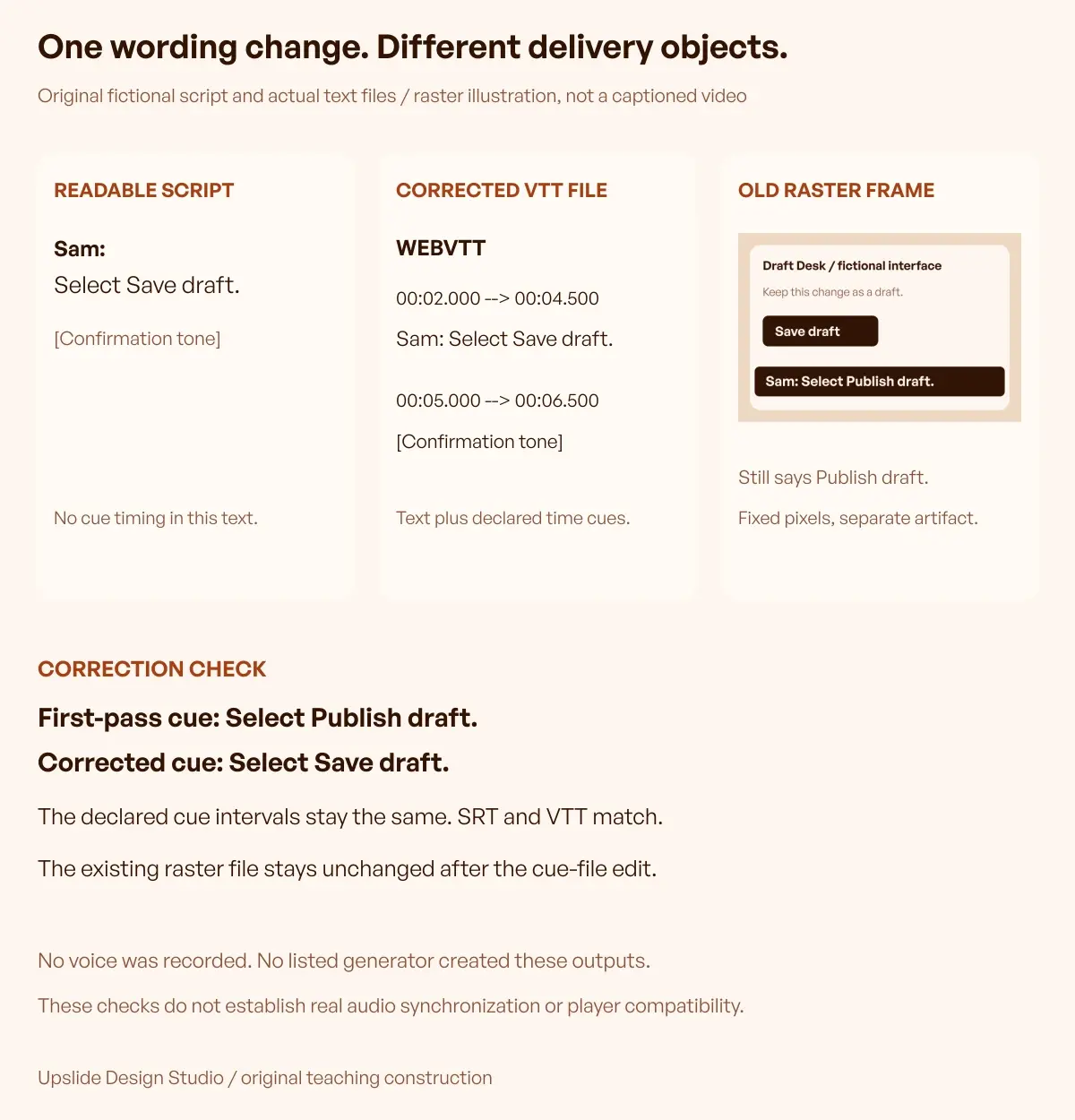
Original construction and declared file checks by Upslide Design Studio. The frame is an illustration, not a captioned MP4 or an output from a listed service.
We changed the cue text to match the declared script while retaining its declared time interval. The changed text file and the unchanged old raster illustrate two different maintenance objects. Updating the file does not redraw text already stored as pixels in another artifact.
The local checks compare the actual cue text and timestamps in the supplied files, and retain hashes for the old frame. They do not measure speech recognition, listening comprehension, media-player compatibility or real-world synchronization.
Repeat the useful correction in a real shortlist
Choose one permitted recording containing the kinds of words the project uses. Define its intended delivery before selecting candidates. There is no need to upload unreleased client material merely to investigate ordinary correction and export controls.
After generation, correct a representative product term and inspect the matching moment. Check whether editing the transcript changes only the caption or also changes the media sequence in that workflow. Preserve the intended meaning when the product offers transcript-driven editing.
Then obtain the actual requested output. Open the subtitle file and inspect its text and timing; play the captioned video in the receiving environment. If a sidecar is required, verify that it can actually be attached and selected there.
Record any mismatch rather than assigning an unexplained quality score. “Caption file downloaded but the target player did not accept it” is a different issue from “product name still wrong in the rendered video.” The follow-up should address the failed boundary.
Recheck after the audio or sequence changes
If a section is removed, a spoken phrase changes or an introduction is added, revisit the cue timing. A previously corrected text file is not automatically synchronized with the new edit.
Keep the caption source associated with a named version of the media. Review the beginning, changed section and ending, then the complete result. A few plausible timestamps do not establish that every cue still corresponds to the right sound.
Retain a clean maintained source when later corrections are expected. A video with permanently visible words can still be useful, but changing those words requires another appropriate rendering operation rather than editing a detached subtitle file alone.
Keep a delivery record someone else can use
| Record | Useful content |
|---|---|
| Media | Approved source and version |
| Language | Spoken source language and any separately reviewed translation |
| Corrections | Exact wording, speaker or sound information checked |
| Timing | Cue file associated with the accepted sequence |
| Delivery | Required video/text-track artifact and actual receiving destination |
| Access | Selected account, download gate and known limitation |
The record should identify what was verified and what remains unresolved. A colleague should not need to infer the approved caption track from several similarly named downloads.
Continue in Resource Box and Inspire
Use Resource Box to revisit the six routes and their current original documentation. Check the required output and account conditions alongside the original provider documentation.
Use Daily Inspire to study how a page makes room for an explanation. Open and credit the original reference. A website preview cannot reveal its hidden captioning workflow or establish that its media is accessible.
The published SaaS website examples guide can help clarify the page's communication job. This caption comparison uses existing resources and an original exercise, so it does not depend on a new daily gallery edition.
Frequently asked questions
Is a transcript the same as a caption file?
A transcript can provide readable text without playback timing. A caption file associates text with time intervals. Inspect which artifact the receiving person or player needs rather than assuming that a text download supplies both.
Can viewers turn off text burned into a video?
The text is part of the rendered picture. A separate selectable caption track behaves differently in a supported player. Preserve the maintained source when a later wording change may require another render.
Does Canva support downloadable captions?
Its Editable Captions guide documents captions downloaded with an MP4. Its separate view-only feature is described as neither editable nor downloadable. Name the feature before applying a general statement to both.
Does every caption generator provide a free SRT?
No such guarantee follows from a free caption preview. Check the exact account and output. VEED's help explicitly places separate subtitle downloads on paid plans; other resources have their own conditions.
Can translated captions prove support for the source language?
Translation and speech transcription are different tasks. Check the language spoken in the input separately from the desired translation. Review the finished wording with someone who can assess that language.
Do accurate words make the whole video accessible?
Caption review also needs relevant sound information and timing. The surrounding visual explanation, controls and delivery can have further requirements. This article does not certify an application's output or a complete media experience.
Were the example captions produced by one of the six tools?
No. The script, deliberate text error, cue files and rasterized teaching frame are original constructions. They explain the delivery distinction without presenting a vendor transcription or an accuracy result.
When should captions be generated again?
Review them when the source audio or sequence changes. Depending on the selected workflow, correction or regeneration may be appropriate. Always inspect the resulting wording and timing against the final accepted media.
Key takeaways
- Choose transcript, separate track and captioned-video outputs deliberately.
- Correct words, meaningful sounds and timing against the accepted source.
- Distinguish similarly named product features and actual account gates.
- Inspect the result in the receiving player or placement.
- Retain the caption source and the media version it belongs to.
Use the file-and-frame exercise as a review brief. Our free UI/UX course supports practical design learning while keeping the same neutral criteria for every resource.


