


Could a colleague use your brand guidelines template to choose the right artwork, find its source and explain how it should be used?
A document can look finished while leaving those questions unanswered. Sample logos, type specimens and color swatches make a template attractive, but they do not establish your company's actual standards. Replacing the cover and keeping the demonstration rules can create a convincing manual for the wrong identity.
This guide compares three existing Resource Box routes: Miro's brand-guidelines board, a specific Canva template by 24 Creative and Visme's Software Company Brand Guidelines template. We inspected public artifacts and current source information. No account template was duplicated, edited or exported for this comparison.
A useful template separates a design choice, its use instruction and the source that supports it.
For designers and SaaS founders, the practical result is a starting document another person can apply. The guide includes a copyable blank record and an original fictional example that leaves an unresolved font choice visibly incomplete.
Design task
Choose the document's purpose before its appearance
A brand-guidelines document explains an identity's intended use. A brand-asset folder stores the material. A project brief describes work to commission, while a presentation template supplies reusable slide structures.
These objects can support each other without doing the same job.
Write down who will use the guide and what they need to decide. An internal product designer might need an approved logo variant and the corresponding source. An external illustrator might need an imagery direction, permitted reference material and someone to contact about an exception.
Keep the first version focused on real recurring decisions. If nobody needs packaging guidance for the current product, a beautiful packaging section may be an unnecessary starting point. If partners repeatedly use the wrong logo version, a clear artwork and application reference deserves more space than another introductory mood image.
Distinguish values from instructions
A hexadecimal color code identifies a value. It does not explain whether that color is an accent, a surface or an approved partner-logo background. A font-family name identifies a typeface, while the intended use still needs its own instruction.
Likewise, a logo file and a diagram showing spacing serve different purposes. Keep the applicable identity rule with the artwork reference. Do not derive a new minimum size or clear-space formula from the dimensions printed in somebody else's template.
Use the same distinction for writing. “Friendly” can be a useful starting label, but an example and an application boundary make it easier to apply. Record what the writer should do in a relevant situation instead of filling the guide with adjectives alone.
| Part of a guideline | What it answers | What remains separate |
|---|---|---|
| Value or asset | Which exact thing should be used? | Whether every use is appropriate |
| Use instruction | Where and how should it appear? | The underlying ownership or license |
| Source reference | Where can the supporting record be found? | Approval of unrelated material |
| Status | What is confirmed or still unresolved? | A guarantee about every future application |
Resource collection
Compare the actual artifacts
| Existing resource | Specific starting artifact | Useful distinction |
|---|---|---|
| Miro | Public Brand Guidelines Template board | A shared visual reference arranged as frames |
| Canva | Neutral Minimalist Brand Guidelines Presentation by 24 Creative | A ten-page landscape sequence with sample identity content |
| Visme | Software Company Brand Guidelines Template | An eleven-page portrait document with use-case examples |
These are alternatives for organizing instructions, not rankings of brand quality. Check the chosen account, assets and output requirements before adopting one for production.
Miro: inspect a visual board's actual sections
The Miro Brand Guidelines Template supplies a public board preview. We opened its actual canvas and inspected nine frames: an introduction, mission, logo, clear space, prohibited treatments, two color-related frames, typography and photography.

Credit: Miro. Existing Resource Box homepage capture, inspected November 2, 2026; original capture date unknown. This image identifies the source and is not a screenshot of the inspected nine-frame guideline board.
The board's grayscale sample artwork makes its structure visible. It contains a “YOUR LOGO” placeholder, a spacing illustration, contrast variants and type specimens. These are useful prompts for deciding what your own guide needs, with the sample rules replaced by the applicable identity decisions.
A board can keep several related sections visible together. Its practical limitation is the reading scale: an overview that shows every frame may make instructions too small to read. Give the user a sensible starting frame and enough direction to locate the relevant rule.
The public preview establishes what we could inspect. It does not establish that we copied the board, changed permissions or tested an exported document. Evaluate those operations in the intended workspace before treating a board link as a complete external handoff.
Canva: replace the sample identity throughout the file
The Neutral Minimalist Brand Guidelines Presentation is credited to 24 Creative. Its public item identifies a landscape presentation, and its preview exposes ten pages of sample material for a skincare identity.
We inspected those public preview images, including brand-logo and logo-usage pages, colors, typography, photography, voice, packaging and introductory content. That provides more useful evidence than judging the cover alone. It also shows how much material must change when the template is adapted to a SaaS brand.

Credit: 24 Creative / Canva. Actual public preview asset from the named template, inspected November 2, 2026. Sample artwork and instructions belong to that demonstration identity; no native template duplication or export test was performed.
One detail in the inspected palette preview deserves attention: visibly different color columns repeat the same hexadecimal text beneath them. This is a limited observation about that public preview. It does not establish the values stored in an editable account file or a general finding about Canva templates.
For your own guide, reconcile every displayed code with the approved source record. Do not assume the swatch, label and document style remain synchronized after replacement. A sample color code is content to verify, rather than evidence that the palette is ready.
The template's photography and packaging directions also need a task-fit review. A skincare photograph is not a SaaS product illustration, and a supplied serif-and-sans pairing is not automatically the type system your team should adopt. Preserve useful document structure while replacing irrelevant identity assumptions.
Canva's brand-guidelines how-to guide distinguishes a guideline document from stored Brand Kit assets. Keep that distinction when evaluating the route. A publicly viewable template, an editable working copy and a team brand-management feature may have different conditions.
Visme: check both specifications and example instructions
The Software Company Brand Guidelines Template has a current public specification of eleven US Letter pages. Its item page describes replacing placeholder content and lists online-sharing and download formats.
We inspected its public cover and About page, along with contents, voice, logo, typography-guide, typography-usage and color-palette previews. Those observations establish the sections discussed here. They are not a claim that the entire editable file or every output format was tested.

Credit: Visme / Easy WebContent. Actual public preview asset from the Software Company template, inspected November 2, 2026. Names, typefaces, sizes and application instructions are sample content, not approved standards for your company.
The useful difference is between its type specimen and its typography-use page. One shows named families and styles; the other places type in different application contexts. That distinction can help a team move beyond listing a font toward explaining its intended role.
The sample copy still needs judgment. An instruction inviting experimentation with typefaces may conflict with a company that requires an approved family for certain materials. Treat such copy as something to resolve with the identity owner, rather than a finished policy supplied by the template.
Likewise, the document's logo dimensions and color specifications belong to its example. Do not borrow them because the template is labelled for a software company. Check your own artwork, use cases and authoritative records.
The provider's format list is useful for shortlisting a route. It does not prove that every listed export is included in the chosen account, that every object remains editable or that every supplied asset can be redistributed. Keep those questions in the production acceptance check.
Fit and limitations
Start with a copyable record
Use the following blank structure for one guideline at a time. Copy it into the document or workspace that fits your team. The structure is a starting record; the empty fields require actual decisions and supporting material.
| Field | Fill in |
|---|---|
| Guideline name | The recurring decision this instruction covers |
| Value or asset | Exact approved value, artwork or source-file reference |
| Intended use | The surface, audience or situation where it applies |
| Use instruction | The actual rule or example the reader should follow |
| Supporting source | Identity record, supplied asset or applicable terms reference |
| Status | Confirmed, proposed or unresolved; define what each means |
| Responsible person | Who can answer questions or approve a change |
| Version or review date | Which instruction the current document represents |
The record separates editorial completeness from the look of the page. A section can have a strong heading and an attractive specimen while its supporting source remains missing. Preserve that gap instead of letting the visual finish imply an approval.
For a compact guide, repeat the structure only for the necessary areas: logo application, color use, typography, imagery and writing. Add other sections when a real use case requires them. There is no useful universal page count that substitutes for answering the reader's decisions.
Apply the structure to a fictional brand
We constructed an original example for a fictional reporting product called Stillframe. Its records include a supplied-logo reference, a sample color instruction and an unresolved typography choice. All names, values and statuses in the exercise are constructed, rather than real client approvals.
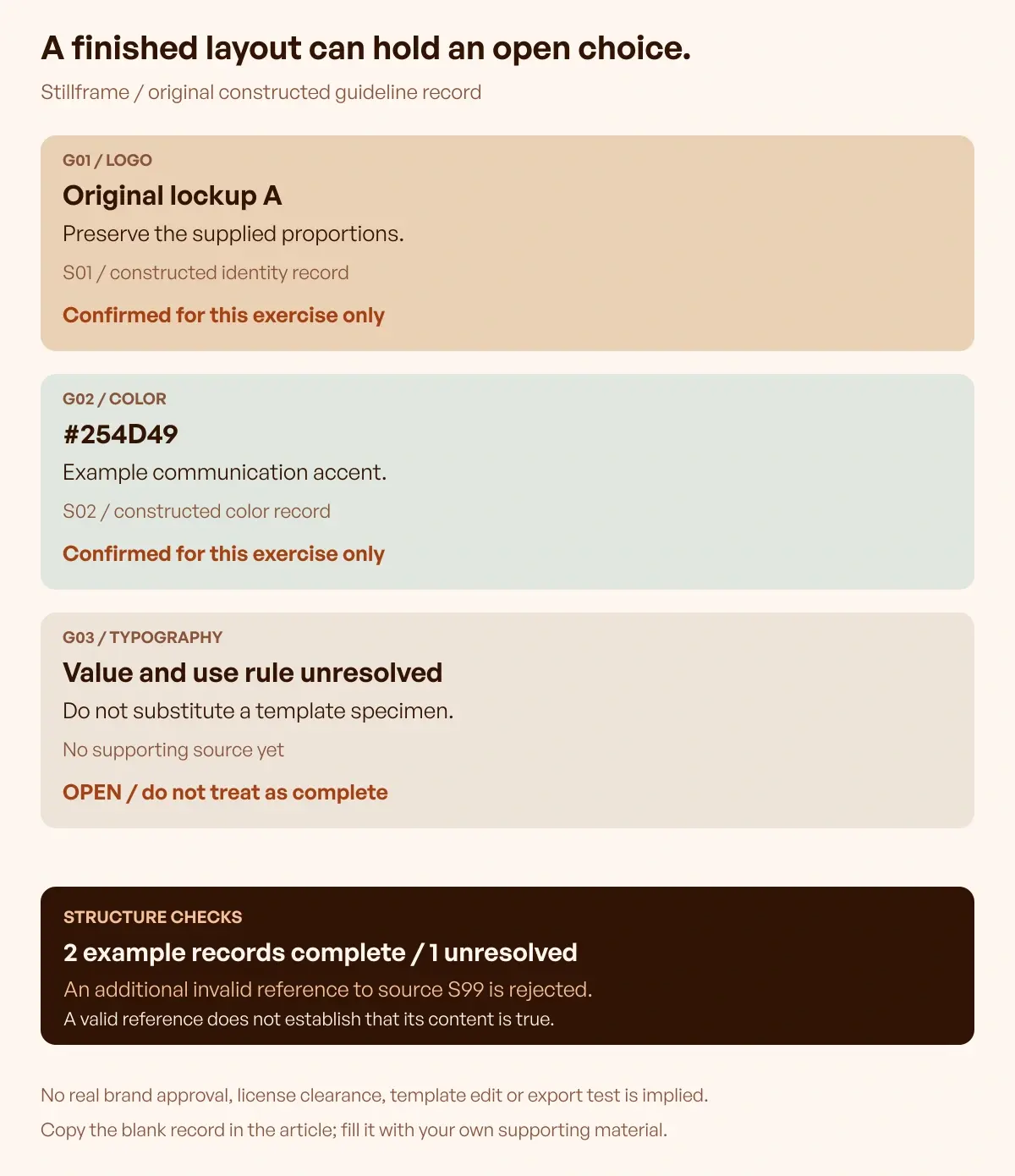
Original explanatory graphic and constructed records: Upslide Design Studio. Executed local reference and readiness checks; no brand, account or legal clearance is implied.
The logo record points to a fictional identity source and preserves its stated use instruction. The color record includes an explicit example value and a separate role. Neither record is evidence that a trademark, artwork or font has been cleared for a real business.
The typography record deliberately has no selected value or supporting source. It stays unresolved even if the document has space for a beautiful type specimen. The local exercise identifies that missing information and prevents the record from being treated as complete.
A separate constructed error points a guideline at a nonexistent source identifier. The reference check catches it. This is a structural demonstration, not a claim that a template application automatically checks sources or that a valid identifier establishes the truth of the referenced material.
Carry an instruction through an ordinary change
Suppose an approved logo variant is replaced. Update the artwork reference and inspect the examples that use it. Check the relevant background and use instruction as well, since changing the image alone may leave the old directions beside the new asset.
Then ask someone else to find the correct variant for one named use. Record whether the guide answers that question and where the person hesitates. This is a proposed review task, not a result collected from participants for this article.
Keep changes scoped to the affected decisions. A new inspiration reference or an additional Resource Box entry does not require replacing the entire guideline document. Revisit a section when the authoritative asset, instruction, terms or actual use case changes.
How to choose
Evaluate a representative slice
Choose a candidate and populate one logo-use record, one color-use record and one type-use record with material your team is permitted to use. Leave unknown values and approvals visible. Avoid inventing instructions simply to complete the preview's layout.
Use realistic source names, a longer instruction and a link another person can follow. Inspect whether the document still reads clearly and whether the selected route supports the intended collaboration. A template that only works with short demonstration labels may need a different structure.
Check the working source separately from its delivery. Open the actual shared view or exported file in the recipient's environment. Verify the parts the recipient needs, including readable instructions and useful links; this comparison did not perform those account-level tests.
Preserve the necessary distinctions
A brand guideline can reference a font without granting permission to share its files. A logo-use instruction can describe an approved application without providing legal clearance for the mark. Record the relevant source and resolve essential uncertainty before a real project depends on it.
Also distinguish brand expression from interface meaning. A brand accent does not automatically become the color for every success, warning or error. Upslide's color-psychology guide discusses that separate problem of context and semantic meaning.
For an earlier typography investigation, the published font-pairing guide provides a focused layout exercise. The guideline document should then record the actual selected approach and its source, rather than restart the selection process on every page.
Give the guide a clear owner
Name the person or role responsible for resolving exceptions and approving changes. That helps distinguish a proposed addition from the current instruction. Keep historical or superseded material identifiable so it is not mistaken for another equally current option.
The guide should support ordinary use without requiring its author to explain every page. Provide a useful entry point, meaningful section labels and links to the relevant approved assets. If a question repeatedly remains unanswered, improve that instruction before adding more decorative sections.
This is an organizational and design task, not an automatic consequence of choosing a popular editor. Select the route that the actual maintainers and readers can use, and preserve the evidence for its limitations.
Continue in Resource Box and Inspire
Use Resource Box to open the three original template routes and inspect their current access and handoff conditions. Compare the actual fields and source instructions with the decisions your team must document.
Use Daily Inspire to investigate attributed visual directions in complete pages. A reference can inform an identity discussion, while the company still needs its own approved artwork and use instructions.
Frequently asked questions
What should a brand guidelines template include?
Include the information required to apply the identity: exact assets or values, their intended use, understandable instructions and supporting sources. Record unresolved choices and who can decide them. Add sections because a real use case needs them, rather than to match a universal page count.
Is a brand kit the same as a guideline document?
A kit can store logos, fonts, colors and other material. A guideline document explains how the relevant material should be used. Check what the selected platform means by its feature names and which operations the actual team can access.
Can I keep the template's sample logo rules?
Use them as prompts to investigate your own requirements. The sample identity's proportions, spacing and dimensions are not automatically your brand's standards. Confirm the instruction with the appropriate source and identity owner before treating it as current guidance.
Are these templates tested as editable downloads?
We inspected public template artifacts and source information. No native account copy, edit or export test was performed. Check the actual intended output and receiving environment before promising a complete editable handoff.
How can I avoid copying an incorrect sample color label?
Match the displayed value with the authoritative color record and the actual swatch. Update the label, sample and use instruction together where necessary. The inspected Canva preview's repeated code illustrates a check to perform, not a general judgment about every template.
Does a font name in the guide permit sharing the font file?
A name in a document does not establish the permissions for the file. Keep the relevant source and applicable terms with the typography record. Resolve the actual project requirements before distributing material or relying on a particular deployment route.
Can an unfinished choice stay in the guide?
Label it as proposed or unresolved and identify the responsible person. Keep it separate from instructions the team is meant to apply. A visible gap is more useful than a polished page that silently turns a placeholder into a standard.
Key takeaways
- Choose the template around the decisions its readers need to make.
- Separate exact values, use instructions, supporting sources and status.
- Replace sample identity content throughout the artifact, including small labels.
- Keep unresolved choices visible and inspect a realistic change before broad handoff.
If you need help turning an identity into clear product and communication materials, we can help through Upslide's design services. The same neutral criteria apply to whichever template or design partner you choose.


